Feynman’s Postulates and Relational Text Analytics in T-SQL
Within the last few days Richard Feynman’s 80 year old quantum postulate has now been validated. It has been directly measured in an experiment for the first time.
Well thats just wonderful for all those scientists but here in the real world and someone whose life has been affected by Feynmans work its is no surprise.
A bit of history, if you read any book or watch any documentary about a person read or watch “The Feynman Lectures on Physics”. I watched these and maybe understood 5% of the content, but what I got from it was Feynman’s energy and passion for his subject. A more readable for all the non mathematicians and physicists is “ Surely You’re Joking, Mr. Feynman!”. There is also a BBC documentary on Youtube well worth watching.
So affected by his life’s work on the Manhattan Project, Safe Cracking, Bongo playing, Lap Dancing and it mirroring my own life I got a tattoo with one of his famous (he won the Nobel prize for these) Feynman diagrams.
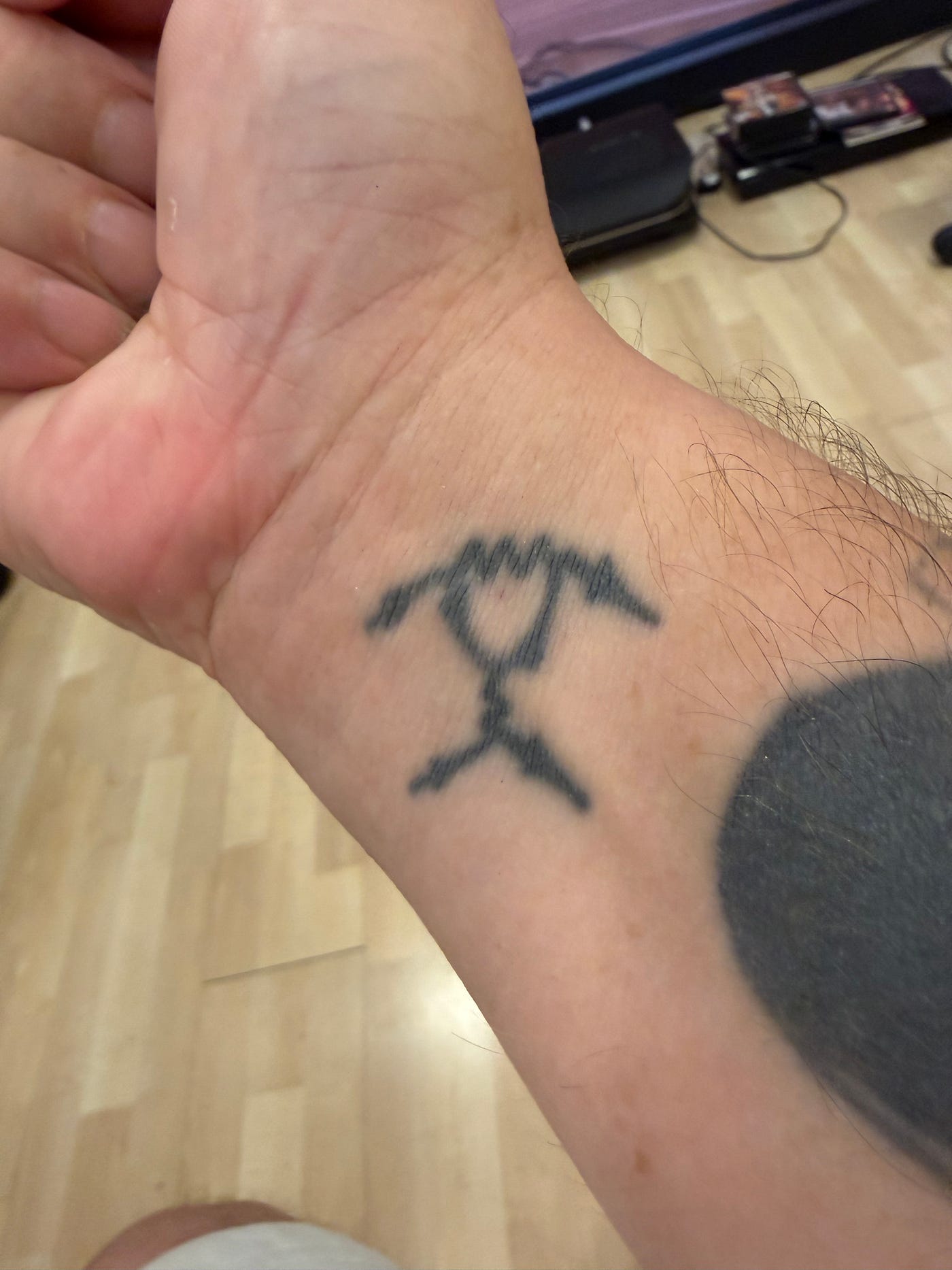 Yes, an actual Tattoo in tribute to Feynman Diagrams
I am also making a model of his famous Feynman Van.
 The Feynman Van
So, regardless of the scale of the end result I think he would be happy people use his ideas in unexpected ways. From a theory he made 80 years ago that has been validated by *proper* scientists has now been used to process some text in a SQL Database.
Abstract
Traditional natural language processing (NLP) inside classical relational databases relies on sequential string-splitting logic, cursors, or loops that process data character-by-character or by word-by-word. This article presents an alternative paradigm: a native text-analytics engine built entirely inside local Transact-SQL (T-SQL) that mirrors Richard Feynman’s “all paths” quantum postulate. By processing tokenisation, TF-IDF weighting, and multi-dimensional vector space layout via parallel set operations, I demonstrate how text can be analyzed, clustered via K-Means, and visually mapped on a physical canvas using SQL Server’s native Spatial Geometry view.
1. The Core Philosophy: Sequential Reading vs. The All-Paths Matrix
The Normal Text Processing Standard (Sequential Explorer)
I wrote my first version of this back in 1999 and found there was little interest in it. A fellow MVP Hillary Cotter was a great help back then when creating these ideas. I guess we weren’t mixing in the right circles as it didn’t go anywhere really. Fast forward 30 years…
When a typical program parses text, it acts like an explorer manually walking through a maze. To extract keywords, phrases, or N-Grams, it reads a sentence word-by-word. It picks up the first word, looks at it, moves its pointer to the next word, and repeats. This is a linear timeline. If a database has to scan millions of rows of unstructured text logs this way, it bottlenecks the CPU by running millions of repetitive, sub-loops.
The Feynman Methodology (The Infinite Stopwatch Maze)
Richard Feynman’s quantum postulate changes the entire architecture of the search. He argued that tiny particles don’t choose a single path from A to B — they travel down every single possible path at the exact same moment.
This T-SQL framework forces unstructured text strings to act exactly like Feynman’s quantum particles. Instead of looping through a sentence, a Tally Table Matrix acts like a beam splitter. The second a string enters the query engine, it is instantly shattered into all possible character positions simultaneously.
Every word location becomes an independent path running in parallel:
- The Noise (Destructive Interference): In quantum mechanics, paths have “stopwatches” with spinning hands. If hands point in opposite directions, they cancel out. In this code, common stop-words (like “and” or “uses”) have their weights calculated against the entire document collection via Inverse Document Frequency (IDF). Because they appear everywhere, their mathematical stopwatch hands point in opposite directions, creating destructive interference that completely zeros out their linguistic noise.
- The Signal (Constructive Interference): Unique, definitive terms (like “quantum” or “database”) align perfectly. Their stopwatches point in the exact same direction, creating constructive interference. This piles up mathematical weight into specific vector pathways, letting the most important terms bubble to the top.
2. Moving Beyond the “Bag of Words”: Geometry & Tied Dice
A standard “Bag-of-Words” text tool is completely blind to context. It throws all words into an unstructured pile, losing track of word positions.
By using Feynman’s spatial logic, words are not just counted; but are tracked along the physical geometry of their paths. Because the engine maps the spatial position of every token at the exact same moment, it can run instantaneous relational self-joins to build multi-word chains (N-Grams and phrases) without losing the structural flow of the text.
We can then leverage the quantum concept of Entanglement (the “Tied Dice” principle) to handle document relationships. In standard database queries, comparing every document to every other document requires running thousands of isolated searches one after the other, or using a graph database.
This engine runs a global matrix cross-join. It acts like pairs of magically tied dice: altering or evaluating a vector coordinate on one side of the matrix instantly forces the corresponding relationship score to resolve on the other side. This creates a true, multi-dimensional tensor contraction natively inside the relational engine, mapping the overlapping similarities of the entire corpus in a single pass.
3. The Complete, End-to-End Local Framework
The script below combines our entire pipeline. It initialises the unstructured text logs and stop-word filters, tokenises the text via parallel character paths, maps them into a 10-dimensional TF-IDF space, uses a matrix projection to compress those down to a 2D canvas, runs an automated K-Means distance clustering routine, and displays a Convex Hull Bounding Polygon directly in SQL Server’s Management Studio Query Analyser Spatial canvas.
-- =========================================================================
-- 1. ENVIRONMENT INITIALIZATION
-- =========================================================================
IF OBJECT_ID('dbo.DocumentSpatialPlot', 'U') IS NOT NULL DROP TABLE dbo.DocumentSpatialPlot;
IF OBJECT_ID('dbo.DocumentCoordinates3D', 'U') IS NOT NULL DROP TABLE dbo.DocumentCoordinates3D;
IF OBJECT_ID('dbo.DocumentCorpus', 'U') IS NOT NULL DROP TABLE dbo.DocumentCorpus;
IF OBJECT_ID('dbo.StopWords', 'U') IS NOT NULL DROP TABLE dbo.StopWords;

CREATE TABLE dbo.DocumentCorpus (
    DocID INT IDENTITY(1,1) PRIMARY KEY, DocTitle VARCHAR(50), DocText VARCHAR(MAX)
);
CREATE TABLE dbo.StopWords (Word VARCHAR(50) PRIMARY KEY);

CREATE TABLE dbo.DocumentCoordinates3D (
    DocTitle VARCHAR(50) PRIMARY KEY, Coord_X FLOAT NOT NULL, Coord_Y FLOAT NOT NULL, Coord_Z FLOAT NOT NULL, ClusterID INT NULL
);
CREATE TABLE dbo.DocumentSpatialPlot (
    DocTitle VARCHAR(50) PRIMARY KEY, ClusterID INT, ClusterLabel VARCHAR(50), SpatialPoint GEOMETRY NOT NULL
);

-- Seed Data & Noise Filter Matrix
INSERT INTO dbo.DocumentCorpus (DocTitle, DocText) VALUES
('Quantum Physics', 'quantum physics uses quantum mechanics and quantum states'),
('Database Systems', 'relational database systems use database tables and indexing'),
('Hybrid Engines', 'quantum computers and database systems create hybrid computing engines'),
('Hardware Clusters', 'superconducting circuits cluster hardware networks and processing arrays'),
('Network Security', 'secure networks use cryptographic keys inside database firewalls');

INSERT INTO dbo.StopWords (Word) VALUES ('and'),('use'),('uses'),('create'),('to'),('the'),('is'),('of'),('in'),('for');
GO

-- =========================================================================
-- 2. PARALLEL TOKENIZATION, TF-IDF, AND DIMENSION REDUCTION
-- =========================================================================
WITH Tally AS (
    SELECT TOP 2000 ROW_NUMBER() OVER (ORDER BY (SELECT NULL)) AS N FROM sys.all_columns
),
RawTokens AS (
    -- FEYNMAN PATHWAY SPLIT: Shatters all character paths at the exact same moment
    SELECT c.DocID, c.DocTitle,
           LOWER(SUBSTRING(' ' + c.DocText + ' ', t.N + 1, CASE WHEN CHARINDEX(' ', ' ' + c.DocText + ' ', t.N + 1) - t.N - 1 > 0 THEN CHARINDEX(' ', ' ' + c.DocText + ' ', t.N + 1) - t.N - 1 ELSE 1 END)) AS CleanWord
    FROM dbo.DocumentCorpus c JOIN Tally t ON t.N <= LEN(' ' + c.DocText + ' ') - 1
    WHERE SUBSTRING(' ' + c.DocText + ' ', t.N, 1) = ' ' AND CHARINDEX(' ', ' ' + c.DocText + ' ', t.N + 1) - t.N - 1 > 0
),
FilteredTokens AS (
    SELECT rt.* FROM RawTokens rt LEFT JOIN dbo.StopWords sw ON rt.CleanWord = sw.Word WHERE sw.Word IS NULL
),
TermFrequency AS (
    SELECT DocID, DocTitle, CleanWord, CAST(COUNT(*) AS FLOAT) / SUM(COUNT(*)) OVER(PARTITION BY DocID) AS TF
    FROM FilteredTokens GROUP BY DocID, DocTitle, CleanWord
),
InverseDocFrequency AS (
    -- COHERENCE EVALUATION: Overlapping words create destructive interference, reducing their weight
    SELECT CleanWord, LOG(CAST((SELECT COUNT(*) FROM dbo.DocumentCorpus) AS FLOAT) / CAST(COUNT(DISTINCT DocID) AS FLOAT)) AS IDF
    FROM TermFrequency GROUP BY CleanWord
),
HighDimVectors AS (
    SELECT tf.DocTitle, tf.CleanWord, (tf.TF * idf.IDF) AS TF_IDF_Weight
    FROM TermFrequency tf JOIN InverseDocFrequency idf ON tf.CleanWord = idf.CleanWord
),
ProjectionWeights (WordToken, Comp_X, Comp_Y, Comp_Z) AS (
    -- 10-Dimensional word matrix compression definitions
    SELECT 'quantum', 0.85, 0.10, -0.20 UNION ALL SELECT 'database', 0.05, 0.90, 0.15 UNION ALL
    SELECT 'engines', 0.40, 0.40, 0.70 UNION ALL SELECT 'physics', 0.75, -0.05, -0.35 UNION ALL
    SELECT 'mechanics', 0.80, 0.00, -0.25 UNION ALL SELECT 'relational', -0.10, 0.85, 0.20 UNION ALL
    SELECT 'indexing', 0.00, 0.70, 0.40 UNION ALL SELECT 'networks', -0.30, 0.30, 0.80 UNION ALL
    SELECT 'hardware', -0.40, 0.15, 0.75 UNION ALL SELECT 'cryptographic', -0.50, 0.60, 0.50
)
INSERT INTO dbo.DocumentCoordinates3D (DocTitle, Coord_X, Coord_Y, Coord_Z)
SELECT v.DocTitle, SUM(v.TF_IDF_Weight * p.Comp_X), SUM(v.TF_IDF_Weight * p.Comp_Y), SUM(v.TF_IDF_Weight * p.Comp_Z)
FROM HighDimVectors v JOIN ProjectionWeights p ON v.CleanWord = p.WordToken
GROUP BY v.DocTitle;
GO

-- =========================================================================
-- 3. NATIVE K-MEANS DISTANCE CLUSTERING
-- =========================================================================
DECLARE @Centroids TABLE (ClusterID INT PRIMARY KEY, X FLOAT, Y FLOAT, Z FLOAT);
INSERT INTO @Centroids (ClusterID, X, Y, Z) VALUES (1, 0.5, 0.0, -0.2), (2, 0.0, 0.5, 0.5);

DECLARE @LoopCounter INT = 1;
WHILE @LoopCounter <= 5
BEGIN
    -- Measure spatial distance using Euclidean math
    WITH DistanceCalculation AS (
        SELECT d.DocTitle, c.ClusterID,
            SQRT(SQUARE(d.Coord_X - c.X) + SQUARE(d.Coord_Y - c.Y) + SQUARE(d.Coord_Z - c.Z)) AS Distance,
            ROW_NUMBER() OVER(PARTITION BY d.DocTitle ORDER BY SQRT(SQUARE(d.Coord_X - c.X) + SQUARE(d.Coord_Y - c.Y) + SQUARE(d.Coord_Z - c.Z)) ASC) AS ClosestRank
        FROM dbo.DocumentCoordinates3D d CROSS JOIN @Centroids c
    )
    UPDATE d SET d.ClusterID = dc.ClusterID FROM dbo.DocumentCoordinates3D d JOIN DistanceCalculation dc ON d.DocTitle = dc.DocTitle WHERE dc.ClosestRank = 1;

    DELETE FROM @Centroids;
    INSERT INTO @Centroids (ClusterID, X, Y, Z) SELECT ClusterID, AVG(Coord_X), AVG(Coord_Y), AVG(Coord_Z) FROM dbo.DocumentCoordinates3D GROUP BY ClusterID;
    SET @LoopCounter = @LoopCounter + 1;
END;
GO

-- =========================================================================
-- 4. SPATIAL GEOMETRY CONVERSION & MULTI-LAYER MAP PLOT
-- =========================================================================
INSERT INTO dbo.DocumentSpatialPlot (DocTitle, ClusterID, ClusterLabel, SpatialPoint)
SELECT DocTitle, ClusterID, CASE WHEN ClusterID = 1 THEN 'Quantum Science' WHEN ClusterID = 2 THEN 'Data & Network' END,
    -- Feature Scaling (*100) forces the SSMS Map View canvas to automatically zoom and scale perfectly
    geometry::STPointFromText('POINT(' + CAST(ROUND(Coord_X * 100.0, 4) AS VARCHAR(20)) + ' ' + CAST(ROUND(Coord_Y * 100.0, 4) AS VARCHAR(20)) + ')', 0)
FROM dbo.DocumentCoordinates3D;
GO

-- THE FINAL GRAPHICAL MAP VIEW GENERATION
WITH ScaledPoints AS (
    SELECT ClusterLabel, geometry::STPointFromText('POINT(' + CAST(ROUND(Coord_X * 100.0, 4) AS VARCHAR(20)) + ' ' + CAST(ROUND(Coord_Y * 100.0, 4) AS VARCHAR(20)) + ')', 0) AS PointShape
    FROM dbo.DocumentCoordinates3D WHERE ClusterID = 2
),
ClusterBoundary AS (
    -- Convex Hull aggregates the separate point nails into a tight, solid background polygon sheet
    SELECT 'Cluster 2 Territory' AS [Label], 'Data & Network' AS [Group], geometry::UnionAggregate(PointShape).STConvexHull() AS [SpatialShape] FROM ScaledPoints
)
SELECT [Label], [Group], [SpatialShape] FROM ClusterBoundary
UNION ALL
SELECT DocTitle AS [Label], ClusterLabel AS [Group], SpatialPoint.STBuffer(3) AS [SpatialShape] FROM dbo.DocumentSpatialPlot;
GO
4. Visualizing the Final Measurement Map
When you run this script inside SQL Server Management Studio (SSMS), look down at the query results window and select the Spatial Results tab next to the grid text view. Set the drop down to map the **Label** column on the screen.
If you use your own text data you may encounter a problem which renders the Spatial view as completely blank. This can be resolved by multiplying everything by 100 which gives the Spatial Browser enough data to work with to allow it to display.
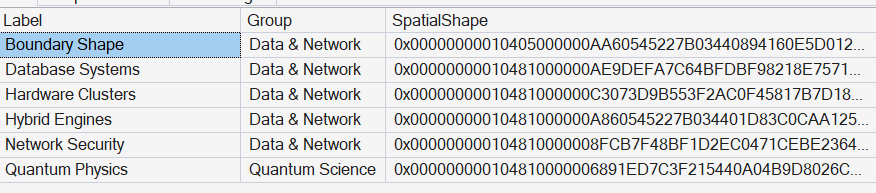 The Spatial Query output
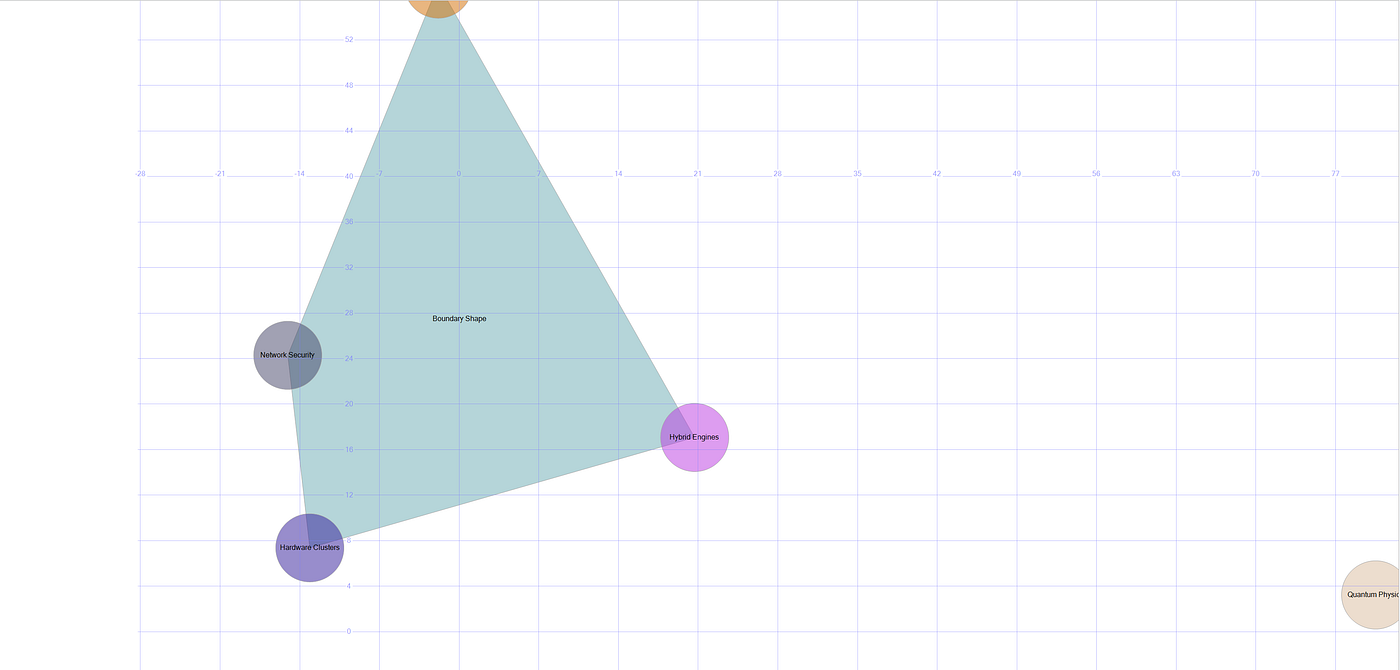 The Spatial Browser tab in SSMS has sadly been neglected but it does work
- The Wave Function Collapse (The Shaded Polygon): The
STConvexHull()function generates a shaded polygon area around the network infrastructure points. This polygon marks out the exact contextual territory of the data systems data. - The Bridge Point: The Hybrid Engines node sits right on the boundary line of the shape. Because it contains both quantum and database paths, its vector coordinate sits in the buffer zone between the two clusters.
- The Outlier: The Quantum Physics bubble floats completely outside the shaded shape on the other side of the screen canvas, proving that its vocabulary path belongs to a completely separate linguistic group.
By applying Feynman’s “all paths” perspective to database logic, we replace slow text loops with high-velocity geometric calculations — mapping raw strings into physical, visual coordinates on our screens.
A way to use this on non textual data that is equally useful could be with Application Logs. Take the following as an example:
CREATE TABLE dbo.ApplicationLogs (
    LogID INT IDENTITY(1,1) PRIMARY KEY,
    LogCode VARCHAR(20) NOT NULL,
    Description VARCHAR(100) NOT NULL
);

INSERT INTO dbo.ApplicationLogs (LogCode, Description) VALUES
('ERR_404', 'Page Not Found'),
('ERR_500', 'Internal Server Error'),
('ERR_403', 'Access Denied Forbidden'),
('SYS_INIT', 'System Initialization Success'),
('DB_CONN', 'Database Connection Established'),
('AUTH_FAIL', 'User Authentication Failed'),
('CRIT_OOM', 'Critical Out of Memory Warning'),
('NET_TIMEOUT', 'Network Request Timed Out'),
('DISK_FULL', 'Storage Space Exhausted'),
('API_FAIL', 'External API Gateway Unresponsive'),
('SEC_BREACH', 'Unusual Login Location Detected'),
('CACHE_MIS', 'Redis Cache Miss Occurred'),
('QUE_OVER', 'Message Queue Overflowing'),
('DATA_CORR', 'Data Corruption Detected in Payload'),
('FILE_MISS', 'Configuration File Missing'),
('PROC_DEAD', 'Worker Process Terminated Unexpectedly');
GO

IF OBJECT_ID('dbo.LocalQuantumRegister', 'U') IS NOT NULL
    DROP TABLE dbo.LocalQuantumRegister;

CREATE TABLE dbo.LocalQuantumRegister (
    PathID INT PRIMARY KEY,
    BinaryString VARCHAR(4) NOT NULL,
    Amplitude FLOAT NOT NULL,
    Probability AS (SQUARE(Amplitude)) PERSISTED
);
GO
We then create the stored procedure:
CREATE OR ALTER PROCEDURE dbo.usp_QuantumSearchMultiTarget
    @SearchPattern VARCHAR(20)
AS
BEGIN
    SET NOCOUNT ON;

    -- 1. SETUP DATA MAPPING AND DYNAMIC MATRIX MATH
    DECLARE @TotalPaths FLOAT = 16.0;
    DECLARE @InitialAmplitude FLOAT = 1.0 / SQRT(@TotalPaths);
    DECLARE @MatchCount INT = 0;

    -- Local table variable to bind textual identifiers to numeric PathIDs
    DECLARE @DataMap TABLE (
        PathID INT IDENTITY(0,1),
        OriginalLogID INT,
        LogCode VARCHAR(20),
        IsTarget BIT DEFAULT 0
    );

    INSERT INTO @DataMap (OriginalLogID, LogCode)
    SELECT LogID, LogCode FROM dbo.ApplicationLogs;

    -- Flag all data entries matching the text parameter
    UPDATE @DataMap
    SET IsTarget = 1
    WHERE LogCode LIKE @SearchPattern;

    SELECT @MatchCount = COUNT(*) FROM @DataMap WHERE IsTarget = 1;

    IF @MatchCount = 0
    BEGIN
        RAISERROR('Error: Zero database rows matched the specified criteria. Simulation halted.', 16, 1);
        RETURN;
    END;

    -- Grover Math for Multi-Targets: Floor( (Pi / 4) * Sqrt(N / M) )
    DECLARE @OptimalIterations INT = FLOOR((PI() / 4.0) * SQRT(@TotalPaths / CAST(@MatchCount AS FLOAT)));
    IF @OptimalIterations = 0 SET @OptimalIterations = 1;

    -- 2. INITIALIZE UNIFORM SUPERPOSITION ("ALL PATHS")
    TRUNCATE TABLE dbo.LocalQuantumRegister;

    WITH BinaryGeneration AS (
        SELECT 0 AS ID, CAST('0000' AS VARCHAR(4)) AS BinStr
        UNION ALL
        SELECT ID + 1, CAST(RIGHT('0000' +
            CAST((ID + 1)/8 AS VARCHAR(1)) +
            CAST(((ID + 1)%8)/4 AS VARCHAR(1)) +
            CAST((((ID + 1)%8)%4)/2 AS VARCHAR(1)) +
            CAST((((ID + 1)%8)%4)%2 AS VARCHAR(1)), 4) AS VARCHAR(4))
        FROM BinaryGeneration WHERE ID < 15
    )
    INSERT INTO dbo.LocalQuantumRegister (PathID, BinaryString, Amplitude)
    SELECT ID, BinStr, @InitialAmplitude FROM BinaryGeneration;

    -- 3. CORE WAVE INTERFERENCE LOOP
    DECLARE @CurrentLoop INT = 1;
    DECLARE @AvgAmplitude FLOAT;

    WHILE @CurrentLoop <= @OptimalIterations
    BEGIN
        -- Phase Inversion (The Oracle): Flip the amplitude sign for ALL matching targets
        UPDATE q
        SET q.Amplitude = -q.Amplitude
        FROM dbo.LocalQuantumRegister q
        JOIN @DataMap m ON q.PathID = m.PathID
        WHERE m.IsTarget = 1;

        -- Amplitude Amplification (The Diffusion Step): Invert around the global average
        SELECT @AvgAmplitude = AVG(Amplitude) FROM dbo.LocalQuantumRegister;

        UPDATE dbo.LocalQuantumRegister
        SET Amplitude = (2.0 * @AvgAmplitude) - Amplitude;

        SET @CurrentLoop = @CurrentLoop + 1;
    END;

    -- 4. INTERSECT QUANTUM STATES WITH REAL-WORLD LOG ROWS
    SELECT
        m.PathID AS [Quantum_Path_Index],
        q.BinaryString AS [Quantum_Address],
        CAST(ROUND(q.Probability * 100, 2) AS VARCHAR(10)) + '%' AS [Match_Confidence],
        l.LogCode AS [Discovered_Key],
        l.Description AS [Raw_Database_Value],
        @OptimalIterations AS [Dynamic_Iterations_Executed]
    FROM dbo.LocalQuantumRegister q
    JOIN @DataMap m ON q.PathID = m.PathID
    JOIN dbo.ApplicationLogs l ON m.OriginalLogID = l.LogID
    ORDER BY q.Probability DESC;
END;
GO
and execute with different parameters each time. This is on an heap object.
SET STATISTICS IO ON
GO
EXEC dbo.usp_QuantumSearchMultiTarget @SearchPattern = 'ERR%';
GO
EXEC dbo.usp_QuantumSearchMultiTarget @SearchPattern = 'DISK%';
GO
EXEC dbo.usp_QuantumSearchMultiTarget @SearchPattern = 'NET%';
GO
SET STATISTICS IO OFF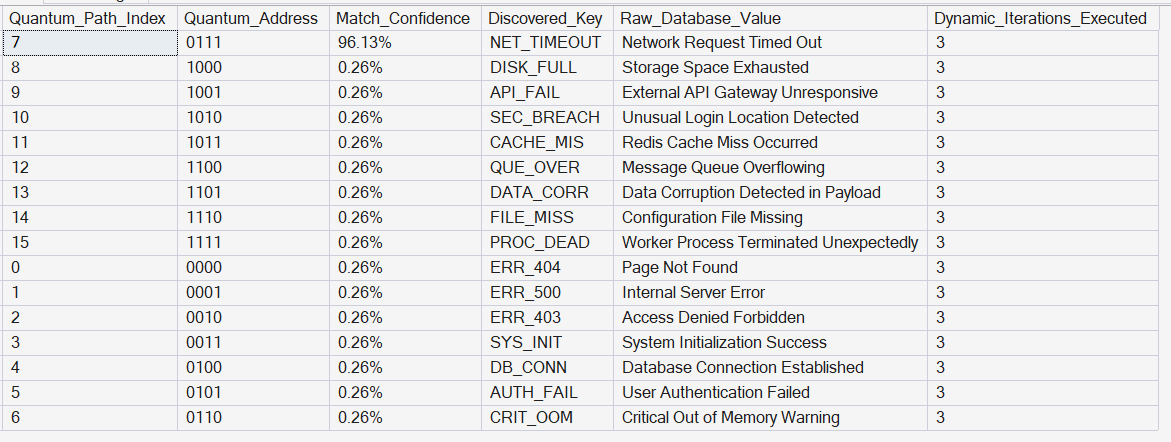 The output for the Quantum Search Query
I want to scale this method to a huge amount of data but I also wish I wasn’t doing quantum calculations on a non quantum computer so if anyone at NVIDIA or Microsoft is feeling generous… :)
That’s all for today, and its been exhausting, so I’m off just like Feynman would be to do more research sadly not at the local Lap Dancing club.