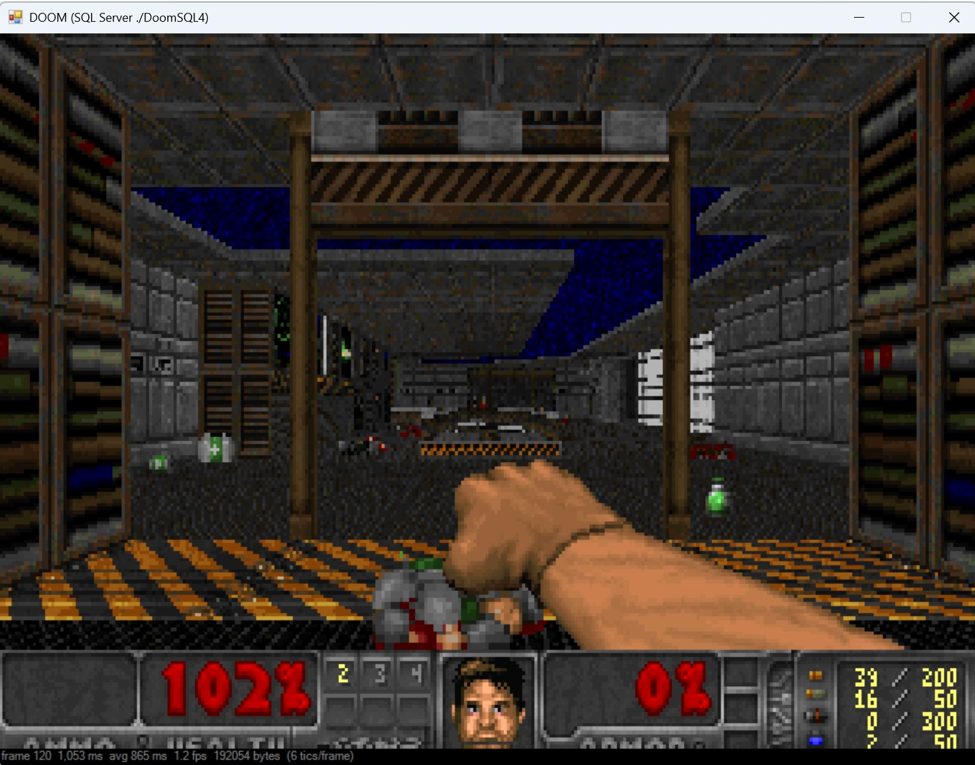
I Built a Language Model Entirely Inside SQL Server
No Python, no CLR, no web services — just tables, joins and a training loop in Transact-SQL, trained on the SQL you find on the internet.
For the last 30 years I have known a single language — SQL. I never did the whole university Computer Science degree, I was hands on using Microsoft Excel 5.0 and then when my data was too large for 16,384 rows I started my journey into Microsoft SQL Server 6.0. Has it been a hindrance not being able to make apps over the data I was storing, of course but it also made me think in sets and I always think of performance the moment I write , not as some afterthought when the system is dying.
Anyway this brings me to a little history and then the good stuff. Back in 1999 I was obsessed with unstructured data, and combining this with the structure in a SQL database had to be the holy grail. So I really got into Morphology, Semantics and Lexical analysis of unstructured data — think Word documents, Adobe PDFs or just plain HTML.
I wrote a whole suite of SQL code that did the parsing into key-phrases and keywords using N-Grams, Algorithm processing using Term Frequency-Inverse Document Frequency (TF-IDF) and eventual display into a multi-dimensional structure (OLAP) which itself was displayed in near real time on a Call centre monitor (HOLAP with Zero Aggregations).
Then I stopped for 27 years, until recently. I started hearing about LLMs and how they were changing the world, everyone out of a job because the code writes itself. Then I look into it and it’s a mess, releases every day and these strangely named models — YaLM 100B (Just like new stars, but there are so many of them they are just given a number, HD 95086) given the strangest of names and no governance or even checks as to the source of the data. For someone that works in data for this long, suddenly the world has gone crazy, how on earth can you trust this stuff? You don’t know its source and to make decisions based on a version of the truth that an LLM produced that was superseded 3 times in a month by another LLM from a company with bigger pockets, which itself was superseded by a country with bigger pockets than the company…
Which finally leads me onto why I am writing an article on using SQL to create, process, analyse and report on how an LLM works internally and you can see how the data moves between its networks and its final output. An interesting point is how many of my SQL friends around the world constantly amaze me with code that shouldn’t be written in SQL for whatever reason and they just nail it, sometimes even out performing the native language. Not bad for a language that is the same age as me.
 The Joy Of Writing Code
Everyone knows a language model is matrix multiplication wearing a hat. Fewer people notice that matrix multiplication is just `GROUP BY` over a join, which means your database server has been quietly capable of this all along. So I built one: weights in tables, forward pass as a query, back propagation as a sequence of `UPDATE` statements. I trained it on a curated corpus of 122 idiomatic SQL queries, so the thing generates SQL.
A language model written in SQL, trained on SQL, that emits SQL.
**The Whole Model Is Five Lines of Algebra
**I went with a Bengio-style neural language model rather than a transformer. It’s the transformer’s direct ancestor, and it’s small enough that every tensor fits comfortably in a table without any of it feeling like a stunt.
A Bengio-style neural language model, introduced by Yoshua Bengio and colleagues in 2003, is a feed forward architecture that predicts the next word in a sequence using a shared word embedding table and a multi-layer perceptron, overcoming the data sparsity limits of traditional n-gram models.
My own work in this area was in 1999 with the TF-IDF algorithm and using this along with a semantic database called WordNet to create structure from unstructured data but stopped due to a complete lack of interest from anyone except a fellow SQL Server MVP Tony Rogerson.
But back to our main subject. Here’s the entire architecture. Context of C tokens, embedding lookup, concatenate, one dense layer with ReLU, project to the vocabulary, softmax:
slot k of C holds token t_k
x[k*D + d] = Emb[t_k, d] concatenated embeddings
z[h] = SUM_i x[i] * W1[i,h] + B1[h]
a[h] = MAX(z[h], 0) ReLU
logit[o] = SUM_h a[h] * W2[h,o] + B2[o]
p[o] = EXP(logit[o] — max) / SUM(…) softmax
Look at lines two and five. `SUM_i x[i] * W1[i,h]` is a sum of products, grouped by `h`. That’s not *like* a `GROUP BY` over a join. It **is** a `GROUP BY` over a join. Every line above becomes one CTE.
Defaults are context 3, embedding dimension 16, hidden 32, vocabulary around 213 tokens. Roughly 12,000 parameters. Small, but genuinely learned rather than counted.
Dimensions live in a config table rather than being hard-coded, so the model is re-sizable without editing a single function:
/* — — — — — — — — — — — — — — — — — — — — — — — — — — — — — — — — —
 Hyperparameters. One row. Every function joins to this instead
 of hard-coding dimensions, so the model is resizable.
 — — — — — — — — — — — — — — — — — — — — — — — — — — — — — — — — — */
DROP TABLE IF EXISTS dbo.ModelConfig;
CREATE TABLE dbo.ModelConfig
(
 lock_col char(1) NOT NULL CONSTRAINT PK_ModelConfig PRIMARY KEY
 CONSTRAINT CK_ModelConfig_OneRow CHECK (lock_col = ‘X’),
 C int NOT NULL, -- context length, in tokens
 D int NOT NULL, -- embedding dimension per token
 H int NOT NULL, -- hidden units
 V int NOT NULL -- vocabulary size
);
INSERT INTO dbo.ModelConfig (lock_col, C, D, H, V) VALUES (‘X’, 3, 16, 32, 0);
Tokenising SQL, In SQL
Before anything can be learned, the corpus has to be shredded into tokens. `COUNT(*)` needs to become three tokens, not one opaque blob, or the model never learns that parentheses have structure.
The naive approach is a chain of `REPLACE` calls padding every punctuation character with spaces. That works right up until it meets `<>`, which the single-character pass happily shreds into `<` and `>`. Two tokens where there should be one, and the model spends its capacity learning that `<` is usually followed by `>`.
The fix is to park the multi-character operators behind placeholders first, then restore them once the single-character pass is done:
/* — — — — — — — — — — — — — — — — — — — — — — — — — — — — — — — — —
 Normalisation. Lower-cases and separates punctuation so that
 “COUNT(*)” becomes “count ( * )” — three tokens, not one blob.

Multi-character operators (<>, >=, <=, !=) are parked behind
 placeholders first, otherwise the single-character pass would
 shred them into two tokens.
 — — — — — — — — — — — — — — — — — — — — — — — — — — — — — — — — — */
CREATE OR ALTER FUNCTION dbo.fn_Normalise (@txt nvarchar(max))
RETURNS nvarchar(max)
AS
BEGIN
 DECLARE @s nvarchar(max) = LOWER(@txt);
-- Park two-character operators.
 SET @s = REPLACE(REPLACE(REPLACE(REPLACE(@s,
 N’<>’, N’~1~’), N’>=’, N’~2~’), N’<=’, N’~3~’), N’!=’, N’~4~’);
-- Pad single-character punctuation with spaces.
 SET @s = REPLACE(@s, N’(‘, N’ ( ‘);
 SET @s = REPLACE(@s, N’)’, N’ ) ‘);
 SET @s = REPLACE(@s, N’,’, N’ , ‘);
 SET @s = REPLACE(@s, N’*’, N’ * ‘);
 SET @s = REPLACE(@s, N’=’, N’ = ‘);
 SET @s = REPLACE(@s, N’<’, N’ < ‘);
 SET @s = REPLACE(@s, N’>’, N’ > ‘);
 SET @s = REPLACE(@s, NCHAR(39), N’ ‘ + NCHAR(39) + N’ ‘); -- single quote
 --Restore the two-character operators, now safely spaced.
 SET @s = REPLACE(REPLACE(REPLACE(REPLACE(@s,
 N’~1~’, N’ <> ‘), N’~2~’, N’ >= ‘), N’~3~’, N’ <= ‘), N’~4~’, N’ != ‘);
WHILE CHARINDEX(N’  ‘, @s) > 0
 SET @s = REPLACE(@s, N’  ‘, N’ ‘);
RETURN LTRIM(RTRIM(@s));
END;
Splitting on spaces is the easy half, but position matters — a language model without token order is just a bag of words. `STRING_SPLIT` only gained an ordinal in SQL Server 2022, which rules it out if you want this running on anything older. `OPENJSON` has always had one:
/* — — — — — — — — — — — — — — — — — — — — — — — — — — — — — — — — —
 Tokeniser. Splits on spaces and returns 1-based positions.
 OPENJSON is used rather than STRING_SPLIT because it yields an
 ordinal on every supported version, not just 2022+.
 — — — — — — — — — — — — — — — — — — — — — — — — — — — — — — — — — */
CREATE OR ALTER FUNCTION dbo.fn_Tokenize (@txt nvarchar(max))
RETURNS TABLE
AS
RETURN
 SELECT pos = ROW_NUMBER() OVER (ORDER BY CAST(j.[key] AS int)),
 token = j.value
 FROM OPENJSON(N’[“‘ + REPLACE(dbo.fn_Normalise(@txt), N’ ‘, N’”,”’) + N’”]’) AS j
 WHERE j.value <> N’’;
Wrap the string in JSON array syntax, let `OPENJSON` do the splitting, and take `[key]` as the position. It’s a hack, but it’s a fast one and it works everywhere.
Randomness Is Harder Than It Looks
Weights start random. In SQL Server that’s a trap, because `RAND()` is evaluated once per statement, not once per row. Use it to initialise a weight table and you get several thousand identical values, a model with no symmetry to break, and a very confusing afternoon.
`CHECKSUM(NEWID())` is evaluated per row, which is what you actually want. There’s a second trap hiding inside it: `ABS()` overflows on the single value `-2³¹`. Take the modulus first — `%` preserves the sign, so you get your uniform distribution either side of zero without needing `ABS()` at all:
/* — — — — — — — — — — — — — — — — — — — — — — — — — — — — — — — — —
 RAND() is constant for the whole statement, so it is useless for
 filling a table. CHECKSUM(NEWID()) is evaluated per row.
 He initialisation for the ReLU layers: scale = sqrt(2/fan_in).
 — — — — — — — — — — — — — — — — — — — — — — — — — — — — — — — — — */
INSERT INTO dbo.W2 (hid, out_id, w)
SELECT h.n, v.token_id,
 (CHECKSUM(NEWID()) % 1000001) / 1000000.0
 * SQRT(2.0 / @H)
FROM (SELECT n FROM dbo.Nums WHERE n < @H) AS h
CROSS JOIN dbo.Vocab AS v;
**The Forward Pass Is One Query
**Here’s the payoff. The entire inference path — embedding lookup, hidden layer, ReLU, output projection, softmax — as a single inline table-valued function. Five CTEs for five lines of algebra:
/* — — — — — — — — — — — — — — — — — — — — — — — — — — — — — — — — —
 fn_NextToken: the complete forward pass in one statement.
 — — — — — — — — — — — — — — — — — — — — — — — — — — — — — — — — — */
CREATE OR ALTER FUNCTION dbo.fn_NextToken (@txt nvarchar(max))
RETURNS TABLE
AS
RETURN
 WITH cfg AS (SELECT D FROM dbo.ModelConfig),
/* x : the concatenated embedding vector, length C*D */
 x AS (
 SELECT i = c.slot * cfg.D + e.dim,
 val = e.w
 FROM dbo.fn_ContextIds(@txt) AS c
 CROSS JOIN cfg
 JOIN dbo.Emb AS e ON e.token_id = c.token_id
 ),
/* z, a : hidden pre-activation and ReLU activation */
 a AS (
 SELECT s.hid,
 act = CASE WHEN s.z + b.w > 0 THEN s.z + b.w ELSE 0 END
 FROM (SELECT w1.hid, z = SUM(x.val * w1.w)
 FROM x JOIN dbo.W1 AS w1 ON w1.inp = x.i
 GROUP BY w1.hid) AS s
 JOIN dbo.B1 AS b ON b.hid = s.hid
 ),
/* logits : one per vocabulary entry. Driven from B2 with a LEFT JOIN
 so that a fully dead hidden layer still yields a complete row set. */
 lg AS (
 SELECT b.out_id,
 logit = b.w + ISNULL(s.s, 0)
 FROM dbo.B2 AS b
 LEFT JOIN (
 SELECT w2.out_id, s = SUM(a.act * w2.w)
 FROM a JOIN dbo.W2 AS w2 ON w2.hid = a.hid
 WHERE a.act > 0
 GROUP BY w2.out_id
 ) AS s ON s.out_id = b.out_id
 ),
/* softmax, with the usual max-subtraction for numerical safety */
 ex AS (
 SELECT out_id, logit,
 e = EXP(logit — MAX(logit) OVER ())
 FROM lg
 )
 SELECT token_id = ex.out_id,
 token = v.token,
 logit = ex.logit,
 p = ex.e / SUM(ex.e) OVER ()
 FROM ex
 JOIN dbo.Vocab AS v ON v.token_id = ex.out_id;
Two details in there are load-bearing.
The `LEFT JOIN` driving the logits from `B2` rather than from the hidden layer looks like belt and braces. It isn’t. Filter on `a.act > 0` and join inwards, and a context that happens to kill every hidden unit produces zero rows — a softmax over nothing. Driving from the bias table guarantees a complete distribution whatever the activations do.
The softmax is split across two scopes for a reason. The obvious one-liner is `SUM(EXP(x — MAX(x) OVER (…))) OVER (…)`, and SQL Server rejects it outright — a windowed function may not appear inside the argument of another windowed function. The max-subtraction and the normalising sum need separate CTE levels. I hit this in two places and it’s the sort of thing you only discover at `CREATE` time.
Back-propagation, And The Order That Matters
Training is where it stops being cute and starts being engineering. Here are the gradients, in the order they must be computed:
dLogit[s,o] = (p[s,o] — 1{o = target[s]}) / B
dW2[h,o] = SUM_s a[s,h] * dLogit[s,o]
dB2[o] = SUM_s dLogit[s,o]
dZ[s,h] = (SUM_o dLogit[s,o] * W2[h,o]) * 1{z[s,h] > 0}
dW1[i,h] = SUM_s x[s,i] * dZ[s,h]
dB1[h] = SUM_s dZ[s,h]
dX[s,i] = SUM_h dZ[s,h] * W1[i,h]
dEmb[t,d] += SUM over every (s,slot) where context token = t, of dX
Read line four and line seven again. `dZ` needs `W2` and `dX` needs `W1` — and both need the values from *before* this batch’s update. Write the weights first and you’ll compute the backward pass against parameters that have already moved.
The model still trains if you get this wrong. It just trains slowly, and silently wrongly, and you’ll spend a week blaming your learning rate. So both gradients are materialised into temp tables before either weight matrix is touched.
The update itself is the part I enjoyed most. SGD with momentum is two assignments — `v ← m*v + g`, then `w ← w — lr*v` — and T-SQL evaluates every right-hand side in an `UPDATE` against pre-update row values. Which means both assignments land in a single statement, with no staging table and no ordering worry:
/* — — — — — — — — — — — — — — — — — — — — — — — — — — — — — — — — —
 SGD with momentum. Both assignments read pre-update values,
 which is exactly the semantics required.
 — — — — — — — — — — — — — — — — — — — — — — — — — — — — — — — — — */
;WITH g AS (
 SELECT a.hid, d.out_id, gr = SUM(a.act * d.g)
 FROM #A AS a
 JOIN #DL AS d ON d.seq_id = a.seq_id
 GROUP BY a.hid, d.out_id
)
UPDATE t
SET v = @Momentum * t.v + g.gr,
 w = t.w — @curLr * (@Momentum * t.v + g.gr)
FROM dbo.W2 AS t
JOIN g ON g.hid = t.hid AND g.out_id = t.out_id;
The gradient for the embedding table is the fiddly one. `dX` comes back indexed by position in the concatenated input vector, so you have to unpick which context slot each index belonged to before you can scatter it onto the right token. Integer division and modulo do the job:
/* — — — — — — — — — — — — — — — — — — — — — — — — — — — — — — — — —
 Scatter dX back onto the embedding rows it came from.
 i / D recovers the context slot; i % D recovers the dimension.
 — — — — — — — — — — — — — — — — — — — — — — — — — — — — — — — — — */
;WITH g AS (
 SELECT c.token_id, dim = dx.i % @D, gr = SUM(dx.grad)
 FROM #DX AS dx
 JOIN #Ctx AS c ON c.seq_id = dx.seq_id AND c.slot = dx.i / @D
 GROUP BY c.token_id, dx.i % @D
)
UPDATE t
SET v = @Momentum * t.v + g.gr,
 w = t.w — @curLr * (@Momentum * t.v + g.gr)
FROM dbo.Emb AS t
JOIN g ON g.token_id = t.token_id AND g.dim = t.dim;
The Bug That Cost Me The Most Time
Not the calculus. A variable name.
I’d declared `@b` for the batch index and `@B` for the batch row count, because that’s how the maths is written. SQL Server compares variable names case-insensitively, regardless of database collation, so those are the same variable. The `DECLARE` fails, every variable declared alongside them becomes unbound, and you get a screen of errors ending in a baffling complaint about a CTE forty lines further down.
The same trap was sitting one line below: a local `@lr` colliding with the `@Lr` parameter. It hadn’t been reported yet only because the `DECLARE` never got that far.
Worth internalising, because the error count tells you nothing. One bad `DECLARE` unbinds everything in it. Fix the first message and re-run rather than working down the list.
Does It Actually Work?
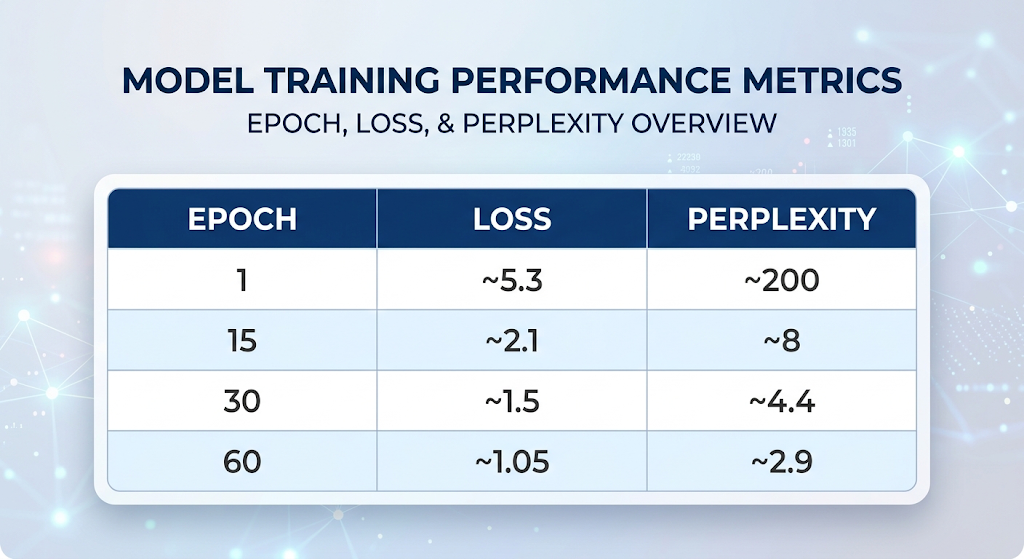
It does. 122 published SQL queries, 60 epochs, roughly two billion row operations:
 Model Training Performance
Perplexity of 2.9 over a 213-token vocabulary means that at each step it’s effectively choosing between about three candidates instead of 213. Prompt it and it produces recognisable SQL — `SELECT`, then a column list, then `FROM`, then a plausible table name.
EXEC dbo.usp_Generate @Prompt = N'SELECT', @Temperature = 0.8, @Samples = 5;
EXEC dbo.usp_Generate @Prompt = N'SELECT * FROM', @Greedy = 1;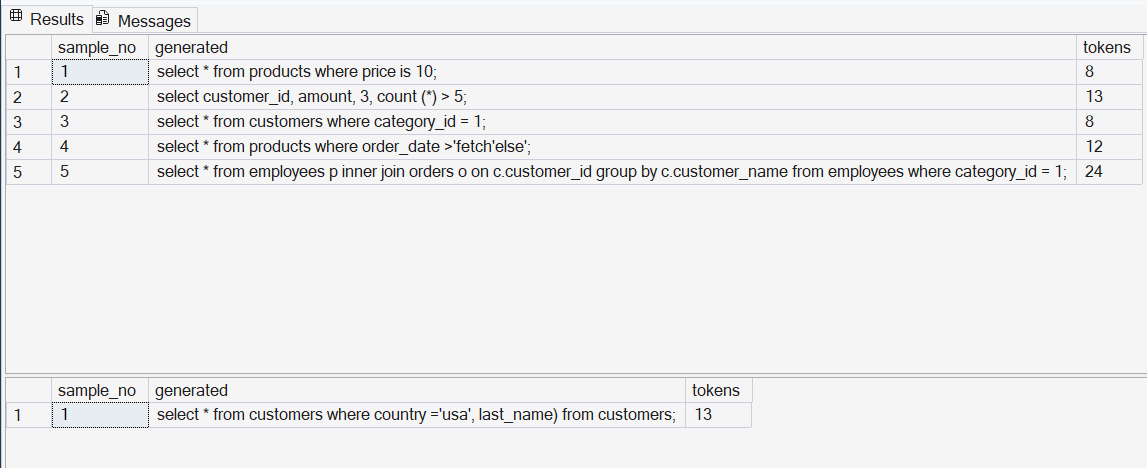 Result of usp_Generate procedure
Two Things SQL Does Better Than Python
I expected this to be a novelty. Two parts genuinely came out nicer than the equivalent imperative implementation, and both come from the same property: the model returns a *relation*.
Because inference is a table-valued function, running a batch of prompts is `CROSS APPLY`. No loop, no padding, no batching logic — one tidy result set:
/* — — — — — — — — — — — — — — — — — — — — — — — — — — — — — — — — —
 Many prompts at once. The model is a table-valued function, so
 CROSS APPLY runs a whole batch and the result is one relation.
 — — — — — — — — — — — — — — — — — — — — — — — — — — — — — — — — — */
SELECT pr.prompt,
 rank_pos = ROW_NUMBER() OVER (PARTITION BY pr.prompt ORDER BY nt.p DESC),
 nt.token,
 probability = FORMAT(nt.p, ‘P1’)
FROM (VALUES
 (N’SELECT’),
 (N’SELECT * FROM’),
 (N’SELECT COUNT(*) FROM orders GROUP BY’),
 (N’INNER JOIN customers c ON’),
 (N’WITH ranked AS (‘),
 (N’UPDATE employees SET’)
 ) AS pr(prompt)
CROSS APPLY (
 SELECT TOP (4) token, p
 FROM dbo.fn_NextToken(pr.prompt)
 ORDER BY p DESC
) AS nt
ORDER BY pr.prompt, nt.p DESC;
prompt rank_pos token probability
------------------------------ -------------------- ------------------------------ ------------------------------
INNER JOIN customers c ON 1 o 43.2%
INNER JOIN customers c ON 2 p 32.7%
INNER JOIN customers c ON 3 c 12.4%
INNER JOIN customers c ON 4 country 3.9%
SELECT 1 * 30.8%
SELECT 2 customer_id 9.4%
SELECT 3 o 3.8%
SELECT 4 c 3.6%
SELECT * FROM 1 customers 29.2%
SELECT * FROM 2 products 25.5%
SELECT * FROM 3 employees 21.6%
SELECT * FROM 4 orders 14.0%
SELECT COUNT(*) FROM orders GR 1 customer_id 55.3%
SELECT COUNT(*) FROM orders GR 2 category_id 10.2%
SELECT COUNT(*) FROM orders GR 3 c 6.9%
SELECT COUNT(*) FROM orders GR 4 country 5.1%
UPDATE employees SET 1 salary 47.9%
UPDATE employees SET 2 department_id 9.7%
UPDATE employees SET 3 product_id 4.2%
UPDATE employees SET 4 ' 3.2%
WITH ranked AS ( 1 select 84.3%
WITH ranked AS ( 2 1 8.8%
WITH ranked AS ( 3 10 1.2%
WITH ranked AS ( 4 50 0.7%The second one is better still. Constrained decoding — forcing generation to obey a grammar — is a genuinely awkward feature to bolt onto a normal inference stack. Here it’s a `WHERE` clause and a renormalising window function. `WHERE` is applied before window functions, so the arithmetic just works out:
/* - - - - - - - - - - - - - - - - - - - - - - - - - - - - - - - - -
  fn_Score runs the forward pass at every position at once and
  returns the probability the model gave to the token that
  actually appeared. High surprisal marks the spots where the
  query departs from what internet SQL usually looks like.
 - - - - - - - - - - - - - - - - - - - - - - - - - - - - - - - - - */
SELECT  position, token,
        probability    = FORMAT(p, 'P2'),
        surprisal_bits = ROUND(surprisal, 2)
FROM    dbo.fn_Score(N'SELECT customer_id, COUNT(*) FROM orders GROUP BY customer_id;')
ORDER BY position;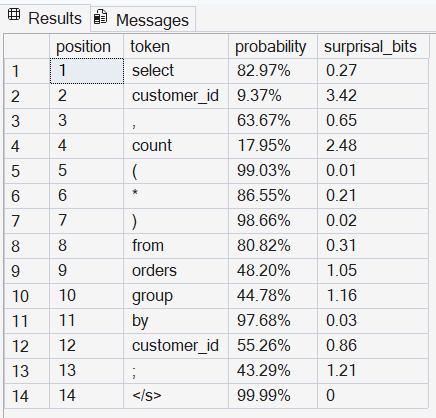
The interesting part is the shape: FROM after a column list will be near-certain, the table name after FROM much less so.
There’s a third benefit that isn’t about queries at all. Nothing is hidden in a binary blob. The trained model is rows, so it can be backed up, diffed, code-reviewed, version-controlled, and shipped by `INSERT`. Cosine similarity between token embeddings is a `GROUP BY` — and run it, and you’ll find table names cluster with table names and aggregates cluster with aggregates. Nobody told it those categories exist.
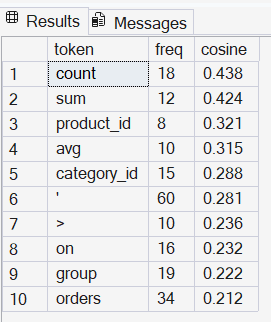
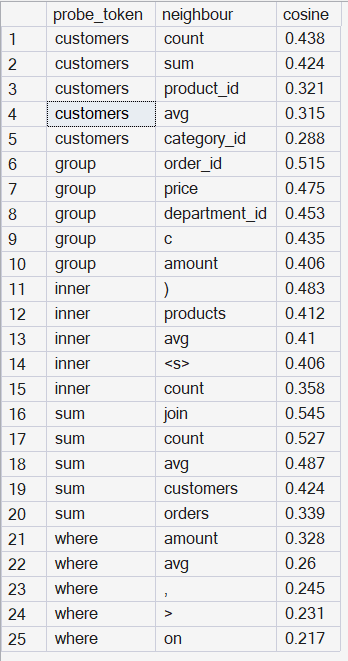 sum does return count and avg
Constrained Decoding
/*==============================================================================
  QUERY 9 -- Constrained decoding.

  Because the distribution arrives as a rowset, constraining generation to a
  grammar is a WHERE clause plus a renormalisation window. No special decoder
  is needed. Here: after FROM, only allow known table names.
==============================================================================*/
SELECT  token,
        p_raw        = FORMAT(p, 'P3'),
        p_constrained= FORMAT(p / SUM(p) OVER (), 'P1')
FROM    dbo.fn_NextToken(N'SELECT * FROM')
WHERE   token IN (N'customers', N'orders', N'products', N'employees',
                  N'payments', N'departments', N'categories')
ORDER BY p DESC;
GO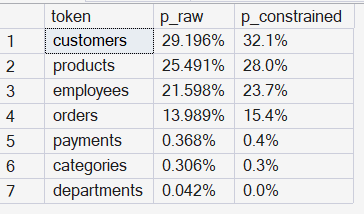
/*==============================================================================
  A SMALL LANGUAGE MODEL, ENTIRELY INSIDE SQL SERVER
  File 04 of 04 : Sampling procedure and example queries against the model

  Everything below treats the language model as what it now is: a set of
  tables, and a function that returns a probability distribution as a rowset.
  That means the usual toolkit -- TOP, WHERE, GROUP BY, CROSS APPLY, window
  functions -- applies to the model itself, not just to its training data.
==============================================================================*/

USE SqlLlm;
GO
SET NOCOUNT ON;
GO

/*==============================================================================
  SAMPLER

  Autoregressive decoding needs a loop, because each step depends on the
  previous one, and a recursive CTE may not call a table-valued function on
  its recursive member. So this is the one part of the system that is
  procedural rather than set-based.

  The context is recovered by re-tokenising the accumulated text each step.
  That is O(n) per token rather than O(1), but n is a few dozen tokens, and
  it keeps the state in one place.
==============================================================================*/
CREATE OR ALTER PROCEDURE dbo.usp_Generate
    @Prompt      nvarchar(max) = N'select',
    @MaxTokens   int   = 40,
    @Temperature float = 0.8,   -- < 1 sharpens, > 1 flattens
    @TopK        int   = 8,     -- sample only from the k most likely tokens
    @Greedy      bit   = 0,     -- 1 = always take the argmax (deterministic)
    @Samples     int   = 1
AS
BEGIN
    SET NOCOUNT ON;

    DECLARE @out TABLE (sample_no int, generated nvarchar(max), tokens int);
    DECLARE @s   int = 1,
            @txt nvarchar(max),
            @i   int,
            @tok nvarchar(100),
            @r   float;

    WHILE @s <= @Samples
    BEGIN
        SET @txt = dbo.fn_Normalise(@Prompt);
        SET @i   = 0;

        WHILE @i < @MaxTokens
        BEGIN
            SET @tok = NULL;

            IF @Greedy = 1 OR @Temperature < 0.05
            BEGIN
                SELECT TOP (1) @tok = token
                FROM   dbo.fn_NextToken(@txt)
                ORDER BY p DESC;
            END
            ELSE
            BEGIN
                SET @r = RAND(CHECKSUM(NEWID()));

                ;WITH topk AS (
                    SELECT TOP (@TopK) token, p
                    FROM   dbo.fn_NextToken(@txt)
                    ORDER BY p DESC
                ),
                tempered AS (
                    SELECT token, q = POWER(p, 1.0 / @Temperature) FROM topk
                ),
                normed AS (
                    SELECT token, q = q / NULLIF(SUM(q) OVER (), 0) FROM tempered
                ),
                cumulative AS (
                    SELECT token,
                           hi = SUM(q) OVER (ORDER BY q DESC ROWS UNBOUNDED PRECEDING)
                    FROM   normed
                )
                SELECT TOP (1) @tok = token
                FROM   cumulative
                WHERE  hi >= @r
                ORDER BY hi;

                -- floating-point tail guard
                IF @tok IS NULL
                    SELECT TOP (1) @tok = token FROM dbo.fn_NextToken(@txt) ORDER BY p DESC;
            END;

            IF @tok IS NULL OR @tok = N'</s>' BREAK;

            SET @txt = @txt + N' ' + @tok;
            SET @i += 1;
        END;

        INSERT INTO @out (sample_no, generated, tokens)
        VALUES (@s, dbo.fn_Detokenise(@txt), @i);

        SET @s += 1;
    END;

    SELECT sample_no, generated, tokens FROM @out ORDER BY sample_no;
END;
GO

/*==============================================================================
  QUERY 1 -- The model card.
  How big is this thing, and what did it read?
==============================================================================*/
SELECT  context_tokens = C,
        embed_dim      = D,
        hidden_units   = H,
        vocab_size     = V,
        total_parameters = V*D + (C*D)*H + H + H*V + V
FROM    dbo.ModelConfig;

SELECT  tensor = 'Emb (token embeddings)', parameters = COUNT(*) FROM dbo.Emb
UNION ALL SELECT 'W1 (input -> hidden)',  COUNT(*) FROM dbo.W1
UNION ALL SELECT 'B1',                    COUNT(*) FROM dbo.B1
UNION ALL SELECT 'W2 (hidden -> vocab)',  COUNT(*) FROM dbo.W2
UNION ALL SELECT 'B2',                    COUNT(*) FROM dbo.B2
ORDER BY parameters DESC;

SELECT  source_site, queries = COUNT(*)
FROM    dbo.Corpus
GROUP BY source_site
ORDER BY queries DESC;
GO

/*==============================================================================
  QUERY 2 -- Next-token distribution.
  The core inference call. Ask the model what comes after a prefix.
==============================================================================*/
SELECT TOP (10)
        token,
        probability = FORMAT(p, 'P2'),
        logit       = ROUND(logit, 3)
FROM    dbo.fn_NextToken(N'SELECT * FROM')
ORDER BY p DESC;

-- How confident is it? Shannon entropy of the same distribution, in bits.
SELECT  entropy_bits = -SUM(p * LOG(p) / LOG(2.0)),
        uniform_bits =  LOG((SELECT V FROM dbo.ModelConfig) * 1.0) / LOG(2.0)
FROM    dbo.fn_NextToken(N'SELECT * FROM');
GO

/*==============================================================================
  QUERY 3 -- Many prompts at once.

  This is the part that is genuinely nicer in SQL than in an imperative
  language: the model is a table-valued function, so CROSS APPLY runs a
  whole batch of prompts and the result is one tidy relation.
==============================================================================*/
SELECT  pr.prompt,
        rank_pos = ROW_NUMBER() OVER (PARTITION BY pr.prompt ORDER BY nt.p DESC),
        nt.token,
        probability = FORMAT(nt.p, 'P1')
FROM    (VALUES
            (N'SELECT'),
            (N'SELECT * FROM'),
            (N'SELECT customer_id,'),
            (N'SELECT COUNT(*) FROM orders GROUP BY'),
            (N'SELECT * FROM customers WHERE'),
            (N'INNER JOIN customers c ON'),
            (N'WITH ranked AS ('),
            (N'UPDATE employees SET')
        ) AS pr(prompt)
CROSS APPLY (
        SELECT TOP (4) token, p
        FROM   dbo.fn_NextToken(pr.prompt)
        ORDER BY p DESC
) AS nt
ORDER BY pr.prompt, nt.p DESC;
GO

/*==============================================================================
  QUERY 4 -- Generation.
  Deterministic first, then sampled at three temperatures.
==============================================================================*/
EXEC dbo.usp_Generate @Prompt = N'SELECT * FROM', @Greedy = 1, @MaxTokens = 40;

EXEC dbo.usp_Generate @Prompt = N'SELECT',        @Temperature = 0.3, @Samples = 3;
EXEC dbo.usp_Generate @Prompt = N'SELECT',        @Temperature = 0.8, @Samples = 3;
EXEC dbo.usp_Generate @Prompt = N'SELECT',        @Temperature = 1.4, @Samples = 3;

EXEC dbo.usp_Generate @Prompt = N'WITH monthly AS (',            @Temperature = 0.7, @Samples = 3;
EXEC dbo.usp_Generate @Prompt = N'SELECT c.customer_name, COUNT(', @Temperature = 0.7, @Samples = 3;
GO

/*==============================================================================
  QUERY 5 -- Scoring.

  fn_Score returns, per token, the probability the model assigned to the
  token that actually appeared. High surprisal marks the spots where the
  query departs from what internet SQL usually looks like.
==============================================================================*/
SELECT  position, token,
        probability   = FORMAT(p, 'P2'),
        surprisal_bits= ROUND(surprisal, 2)
FROM    dbo.fn_Score(N'SELECT customer_id, COUNT(*) FROM orders GROUP BY customer_id;')
ORDER BY position;

-- Typical query versus deliberately odd query, side by side.
SELECT  q.label,
        tokens      = COUNT(*),
        avg_bits    = ROUND(AVG(s.surprisal), 3),
        perplexity  = ROUND(EXP(-AVG(s.log_p)), 2)
FROM    (VALUES
            (N'idiomatic',  N'SELECT * FROM customers WHERE country = ''germany'';'),
            (N'idiomatic',  N'SELECT category_id, AVG(price) FROM products GROUP BY category_id;'),
            (N'unusual',    N'SELECT GROUP BY customers price WHERE FROM ;'),
            (N'unusual',    N'DELETE products SET orders JOIN AVG ( 3 ;')
        ) AS q(label, sql_text)
CROSS APPLY dbo.fn_Score(q.sql_text) AS s
GROUP BY q.label, q.sql_text
ORDER BY perplexity;
GO

/*==============================================================================
  QUERY 6 -- Perplexity leaderboard over the training corpus.

  Which published queries does the model find most and least predictable?
  The worst-scoring rows are the ones whose patterns appear only once, which
  makes this a serviceable outlier detector for a query log.
==============================================================================*/
WITH scored AS (
    SELECT  c.doc_id, c.source_site, c.query_text,
            tokens     = COUNT(*),
            perplexity = EXP(-AVG(s.log_p))
    FROM    dbo.Corpus AS c
    CROSS APPLY dbo.fn_Score(c.query_text) AS s
    GROUP BY c.doc_id, c.source_site, c.query_text
)
SELECT  band = CASE WHEN rn <= 8 THEN 'most predictable' ELSE 'least predictable' END,
        query_text, tokens, perplexity = ROUND(perplexity, 2)
FROM (
    SELECT *, rn = ROW_NUMBER() OVER (ORDER BY perplexity),
              rd = ROW_NUMBER() OVER (ORDER BY perplexity DESC)
    FROM scored
) AS x
WHERE rn <= 8 OR rd <= 8
ORDER BY perplexity;
GO

/*==============================================================================
  QUERY 7 -- What did the embeddings learn?

  Cosine similarity between token vectors. Restricted to reasonably frequent
  tokens, because a token seen twice has an embedding that barely moved from
  its random initialisation.

  Expect table names to cluster with table names, and aggregate functions to
  cluster with aggregate functions -- the model was never told that these
  categories exist.
==============================================================================*/
DECLARE @probe nvarchar(100) = N'customers';

WITH probe AS (
    SELECT e.dim, e.w
    FROM   dbo.Emb AS e
    JOIN   dbo.Vocab AS v ON v.token_id = e.token_id
    WHERE  v.token = @probe
),
pnorm AS (SELECT nrm = SQRT(SUM(w * w)) FROM probe)
SELECT TOP (10)
        v.token, v.freq,
        cosine = ROUND(SUM(e.w * probe.w)
                       / (SQRT(SUM(e.w * e.w)) * MAX(pnorm.nrm)), 3)
FROM    dbo.Emb AS e
JOIN    probe ON probe.dim = e.dim
JOIN    dbo.Vocab AS v ON v.token_id = e.token_id
CROSS JOIN pnorm
WHERE   v.freq >= 8
  AND   v.token <> @probe
GROUP BY v.token, v.freq
ORDER BY cosine DESC;
GO

-- The same probe, run over several tokens at once.
SELECT  probe.token AS probe_token, nn.token AS neighbour, nn.cosine
FROM    (VALUES (N'customers'), (N'sum'), (N'where'), (N'inner'), (N'group'))
            AS probe(token)
CROSS APPLY (
    SELECT TOP (5)
           v.token,
           cosine = ROUND(SUM(e.w * pe.w)
                          / (SQRT(SUM(e.w * e.w)) * MAX(pn.nrm)), 3)
    FROM   dbo.Emb AS e
    JOIN   dbo.Vocab AS v ON v.token_id = e.token_id
    JOIN  (SELECT e2.dim, e2.w
           FROM   dbo.Emb AS e2
           JOIN   dbo.Vocab AS v2 ON v2.token_id = e2.token_id
           WHERE  v2.token = probe.token) AS pe ON pe.dim = e.dim
    CROSS JOIN (SELECT nrm = SQRT(SUM(e3.w * e3.w))
                FROM   dbo.Emb AS e3
                JOIN   dbo.Vocab AS v3 ON v3.token_id = e3.token_id
                WHERE  v3.token = probe.token) AS pn
    WHERE  v.freq >= 8 AND v.token <> probe.token
    GROUP BY v.token
    ORDER BY cosine DESC
) AS nn
ORDER BY probe.token, nn.cosine DESC;
GO

/*==============================================================================
  QUERY 8 -- Vector arithmetic on the embedding table.

      vec('orders') - vec('order_id') + vec('customer_id')  ~=  ?

  On a corpus this small the result is noisy, and it is honest to say so;
  the point is that the arithmetic is a GROUP BY over a 16-column table.
==============================================================================*/
DECLARE @a nvarchar(100) = N'orders',
        @b nvarchar(100) = N'order_id',
        @c nvarchar(100) = N'customer_id';

WITH target AS (
    SELECT  e.dim,
            w = SUM(CASE v.token WHEN @a THEN e.w WHEN @b THEN -e.w WHEN @c THEN e.w END)
    FROM    dbo.Emb AS e
    JOIN    dbo.Vocab AS v ON v.token_id = e.token_id
    WHERE   v.token IN (@a, @b, @c)
    GROUP BY e.dim
),
tnorm AS (SELECT nrm = SQRT(SUM(w * w)) FROM target)
SELECT TOP (8)
        v.token,
        cosine = ROUND(SUM(e.w * target.w)
                       / (SQRT(SUM(e.w * e.w)) * MAX(tnorm.nrm)), 3)
FROM    dbo.Emb AS e
JOIN    target ON target.dim = e.dim
JOIN    dbo.Vocab AS v ON v.token_id = e.token_id
CROSS JOIN tnorm
WHERE   v.freq >= 5 AND v.token NOT IN (@a, @b, @c)
GROUP BY v.token
ORDER BY cosine DESC;
GO

/*==============================================================================
  QUERY 9 -- Constrained decoding.

  Because the distribution arrives as a rowset, constraining generation to a
  grammar is a WHERE clause plus a renormalisation window. No special decoder
  is needed. Here: after FROM, only allow known table names.
==============================================================================*/
SELECT  token,
        p_raw        = FORMAT(p, 'P3'),
        p_constrained= FORMAT(p / SUM(p) OVER (), 'P1')
FROM    dbo.fn_NextToken(N'SELECT * FROM')
WHERE   token IN (N'customers', N'orders', N'products', N'employees',
                  N'payments', N'departments', N'categories')
ORDER BY p DESC;
GO

/*==============================================================================
  QUERY 10 -- Training diagnostics.
==============================================================================*/
SELECT  epoch, avg_loss = ROUND(avg_loss, 4),
        perplexity = ROUND(perplexity, 3),
        lr = ROUND(lr, 5), elapsed_ms
FROM    dbo.TrainLog
ORDER BY epoch;

-- Loss reduction per epoch, as a window function over the log.
SELECT  epoch,
        perplexity  = ROUND(perplexity, 3),
        delta       = ROUND(perplexity - LAG(perplexity) OVER (ORDER BY epoch), 4)
FROM    dbo.TrainLog
ORDER BY epoch DESC;

-- Weight magnitudes. A hidden unit whose W2 row is near zero has stopped
-- contributing; a very negative B1 usually means a dead ReLU.
SELECT  tensor = 'W1', mean_abs = ROUND(AVG(ABS(w)), 5), max_abs = ROUND(MAX(ABS(w)), 4) FROM dbo.W1
UNION ALL SELECT 'W2',  ROUND(AVG(ABS(w)), 5), ROUND(MAX(ABS(w)), 4) FROM dbo.W2
UNION ALL SELECT 'Emb', ROUND(AVG(ABS(w)), 5), ROUND(MAX(ABS(w)), 4) FROM dbo.Emb;

SELECT  dead_ish_hidden_units = COUNT(*)
FROM    dbo.B1
WHERE   w < -0.5;
GO

/*==============================================================================
  QUERY 11 -- The whole model, as data.

  Nothing here is hidden in a binary blob. This is the entire trained model,
  and it can be backed up, diffed, version-controlled, or shipped by INSERT.
==============================================================================*/
SELECT TOP (20) v.token, e.dim, weight = ROUND(e.w, 4)
FROM    dbo.Emb AS e
JOIN    dbo.Vocab AS v ON v.token_id = e.token_id
--WHERE   v.token = N'select'
ORDER BY e.dim;
GO
Where It Falls Over
I’d rather say this plainly than oversell it.
A three-token context window means it has learned local SQL *syntax*, not SQL *semantics*. It’ll cheerfully open a `WITH` clause and never close it, or emit `WHERE order_id = ‘london’`. It has no idea what a table is.
122 training queries is a very small corpus, so it memorises templates as much as it generalises. Embedding neighbours are meaningful for frequent tokens and close to noise for rare ones, whose vectors have barely moved from initialisation.
And autoregressive sampling stays stubbornly procedural. Each token depends on the last, and a recursive CTE can’t call a table-valued function on its recursive member. That one loop is the only imperative code in the whole system.
The Point
This isn’t how you should serve a language model. It’s a demonstration that the gap between “database engine” and “machine learning framework” is narrower than the tooling implies. Both are doing sums over sets. One of them just has better marketing.
If you work with SQL every day, building one of these will teach you more about what a language model actually does than any number of tutorials with a `model.fit()` in them. There’s nowhere to hide. Every matrix multiply is a join you wrote yourself.
There’s a detail here I didn’t notice until I’d finished writing the code. In 1999 I was doing n-grams and TF-IDF in T-SQL, and I stopped because nobody was interested. The wall I’d have hit next is data sparsity — n-grams can only count what they’ve already seen, and most sequences they never see at all.
Bengio’s paper is the answer to exactly that problem. It was published in 2003. I put the work down four years too early.
So this isn’t a departure from what I was doing back then. It’s the next page of it, in the same language, twenty-seven years later. I write Python when the job needs it. I’ve never needed a second language for the part I actually care about.
The full scripts run on SQL Server 2016 or later, and on Azure SQL. Four files: schema and corpus, model and forward pass, training, example queries. They can be ported in principle to PostgreSQL though the tokeniser and temp tables need rewriting.
I would suggest running the code from the scripts rather than copy/paste from this article as the Medium publishing tool replaces characters that are needed. I think I caught them all but the files have been run and tested.
https://drive.google.com/drive/folders/1BGKPr8nkRhQmrKZPmFr49MmPDvi2QL4k?usp=sharing
**If this was useful, a few claps help other people find it. Follow me for more on SQL as a computational medium — I keep finding things it can do that it probably shouldn’t.**
*What’s the strangest thing you’ve built inside a database? I’d genuinely like to know — leave a comment.*