Running 1,000 Standalone SQLite Databases Inside SQL Server
The Shape Was the Same
Walking Into the Wrong Room
When I walked into a UK government department a while back to work on their new enterprise data platform, I spent the first 15 minutes wondering if someone had muddled up the CVs. Everything on the wall was Linux, Kubernetes, Apache Spark, and Python, Christ they even had Apple laptops. None of that was my background. I have spent thirty years on Windows, deep in relational engines, execution plans, statistics, and what SQL Server is doing to the disks underneath. It took me 15 years to unlearn that the minimize button on an Apple window is on the other side.
Then the architects started drawing how the platform worked on the board, and I realised why I was there, to the point that afterwards I started asking questions like, did you work for [redacted] all those years ago? are you sure? it was called something else back then. Once you ignored the container names and the Python wrappers, the system they were drawing was the same shape as one I had knocked together over a weekend in the late-1990s.
Back then, my old team had a problem. We had a pretty large number of incompatible databases across different divisions, and we needed them to behave like a single system without forcing everybody onto a single schema. Up to that point we had been using Microsoft Site Server’s repository, which was fine for simple property lists and hopeless the moment hierarchies and cross-server relationships got deep. I got so annoyed that the only way I could convince them that SQL Server was the way to go if they wanted the scalability was to show them. One Friday evening I went home, wrote a fresh core from scratch over the weekend, and brought a working prototype in on Monday morning. We called it iaFramework, sitting on top of a metadata database named iaMeta. Even though this was so long ago I do still think it was the best thing I had ever developed.
Instead of building hundreds of physical tables every time the business thought up a new entity, iaMeta described the organisation using four tables: Objects, Attributes, Containment Relationships, and Multi-Value Attributes. Alongside those, you registered your remote server names and OLE-DB or ODBC connections for whatever Oracle, SQL Server, or flat-file stores sat on the network. Once you loaded your definitions, which were created from the usual interviews and system reviews, the Information Architecture was born.
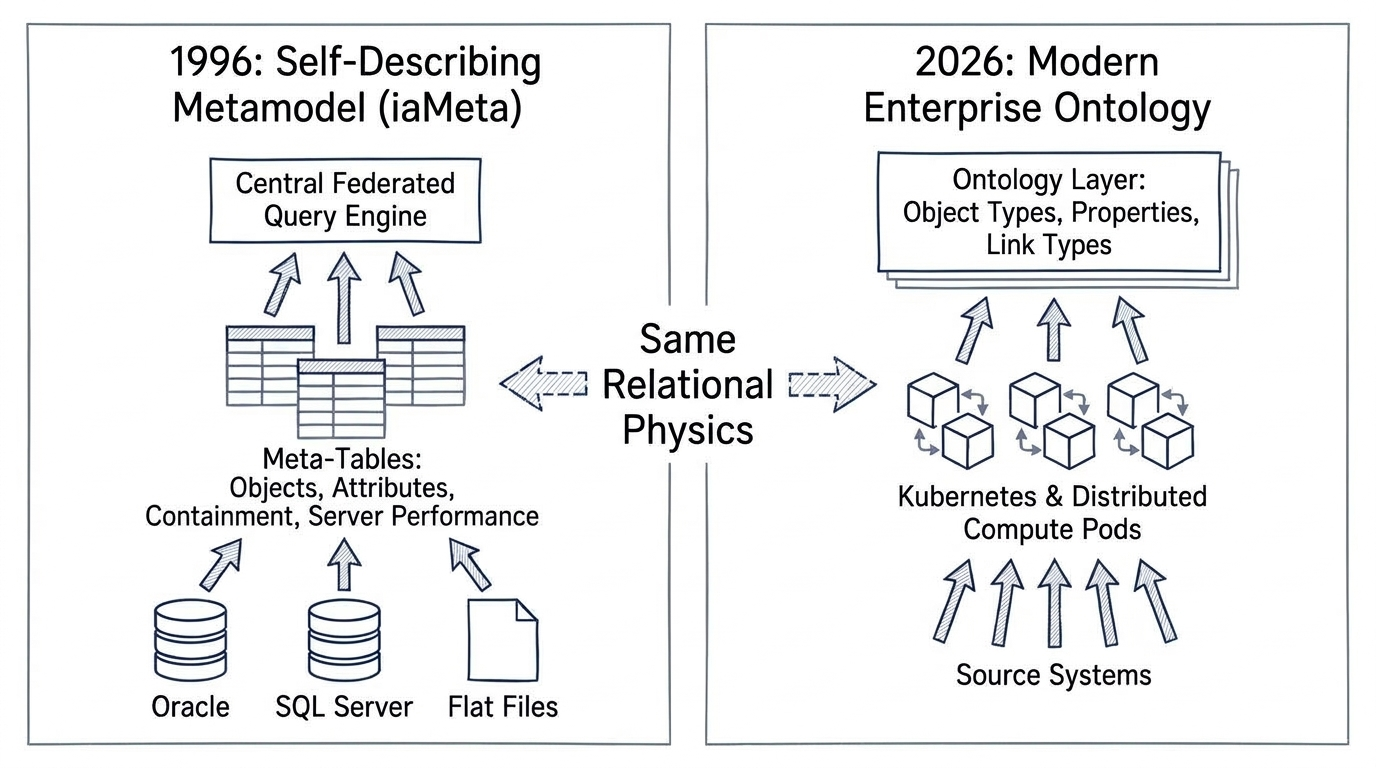 Figure 1: Our 1996 iaMeta federated metamodel next to a modern Kubernetes Ontology stack.
Anyone who has ever watched an Entity-Attribute-Value design hit production will know why they usually die a horrible death: a simple query turns into a six-way self-join and the query optimiser gives up. Ours stayed brisk for two reasons. First, because we lived inside SQL Server’s storage engine, iaFramework built real physical covering indexes behind the virtual objects based on actual selectivity. Second, each server kept a running log of how every remote server answered queries. Before firing a distributed join across the network, it checked the history table to see which box was sluggish and pushed the predicates to the right place.
Thirty years on, the industry calls that metadata layer an Ontology and parks a Spark cluster underneath it. Watching that cluster run in a government building was instructive, mostly for the amount of machinery involved. To join operational datasets that were wide and awkward rather than genuinely huge, the platform was spinning up worker nodes, negotiating pods, and shuffling data over the network for jobs a decent desktop could finish while the cluster was still clearing its throat.
I was actually in the room the day the engineering team announced, very pleased with themselves: “Trevor, you have finally got your lightweight version. We don’t have to spin up all these nodes anymore.” Someone had added a flag to keep execution on one local node instead of fanning it out across the cluster. Almost every data feed in the department only ever needed that flag.
Jim Gray, Keeping the Receipt, and Clause 5
There is an old fault line in semantic layers that still catches teams out. Raw data lands in staging tables cleanly enough, and then a pipeline starts renaming columns, splitting entities, and wiring up relationships. Halfway through step eight of ten, something fails, and your users are left looking at half-updated objects because nobody carried proper transactions across the boundary.
Years ago, I was lucky enough to know Jim Gray at Microsoft Research. Anyone in our industry knows Jim wrote the book on transaction processing and co-created much of the world we work in, yet he was absurdly generous with his time. He showed me round the TerraServer hardware, sketched SkyServer spatial logic on a napkin when we met in London, and once sent me an email at five in the morning with a custom slice of the SkyServer database attached so I could play with it myself. After we lost him, I wrote a piece called 20 Years a Database Legend. The thing Jim drilled into everyone was simple enough: the transaction log is the truth, and a table or a view is just where that log happens to stand at version N.
When my old team built the ingestion path into our semantic model, we leaned on materialised views and version numbers so the whole run stayed ACID from the raw landing tables right through to the renamed business objects. Nothing overwrote live state in place. Every batch stamped a new version watermark, and if someone spotted an hour later that an upstream feed was full of rubbish, rolling the whole semantic layer back to Tuesday’s clean state meant changing one flag.
Speaking of database history, there is a small legal wrinkle worth getting out of the way before we look at any code. Back in 1982, a young Wisconsin professor named David DeWitt published honest benchmark numbers on commercial databases, Larry Ellison hit the roof, and database vendors responded by writing what became known as the DeWitt Clause into their licence agreements. Even today, Clause 5 of the SQL Server 2025 licence terms (including the free Developer Edition) forbids publishing benchmark test results of SQL Server without Microsoft’s prior written approval. The lovely irony is that in 2008 Microsoft hired David DeWitt himself as a Technical Fellow to open and run the Microsoft Jim Gray Systems Lab in Madison for the SQL Server team, yet the lawyers still kept his clause in the EULA. SQLite, by contrast, sits in the public domain with no restrictions whatsoever. So in what follows, I am keeping SQL Server’s own stopwatch numbers to myself and sticking strictly to architectural mechanics, storage footprints, candidate pruning ratios, and how public-domain SQLite behaves once it’s stored in memory.
Putting SQLite Inside a SQL Server Row (Without the Buzzwords)
That old single-box instinct started itching again recently while I was working on two seemingly unrelated problems. First, I have been building a local corpus of UK Parliament Hansard speeches across all 650 Westminster constituencies, using a pair of RTX 5090 cards in my workstation to score and cluster what MPs talk about. Second, imagine an internet provider hosting 10,000 small customer sandboxes where every tenant wants to run CREATE TABLE, invent their own columns, and download their own database whenever they feel like leaving.
Try creating 10,000 separate databases on one SQL Server instance and you will make yourself miserable very quickly: file handles, recovery checkpoints, backup schedules, and memory turn a decent machine into a painful experience. Put 10,000 customers into one shared database and let them create half a million tables, and sys.objects contention becomes a full-time job. Put everybody into one fixed table, and nobody is allowed their own schema or a clean file export.
Which led to a slightly daft late-night question: a SQLite database is just a single file on disk, and a file is just bytes. What happens if you store a complete, standalone SQLite database inside a VARBINARY(MAX) column in SQL Server, and mount it in memory only when a query asks for it?
Before I show the schema, a small request for plain English. Read almost any recent cloud post, or ask an AI tool to name the parts of a design like this, and within three sentences every companion row or helper process is being called a sidecar, a shim, or a daemon. Photography had .xmp metadata files sitting next to RAW camera files for years; Kubernetes borrowed the word for container pods, and language models now use it for everything. If you have worked in SQL Server for thirty years, a row of JSON metadata sitting next to a binary row is just Row 2.
Why Row 1 Needs Row 2
Windows 11 and Windows Server already ship with a native copy of SQLite sitting in C:\Windows\System32\winsqlite3.dll. You do not even have to install anything. A small C# SQLCLR assembly can take an extracted byte array, pass the pointer to sqlite3_deserialize(), run a SQLite query purely in RAM, and hand the result rows back to T-SQL through CROSS APPLY.
The catch is obvious the moment you think about storage. If you put 650 or 10,000 SQLite files into Row 1 by themselves, the host database cannot see a thing inside those binary blobs. Asking which MPs spoke about energy above a certain score would force the host to drag all 409 MB of binary blobs off disk and open all 650 SQLite engines just to check. Worse, changing one number inside a 6 MB SQLite blob would log a 6 MB binary rewrite.
Adding Row 2 directly underneath Row 1 fixes the blindness, and a small relational change-log table fixes the writes.
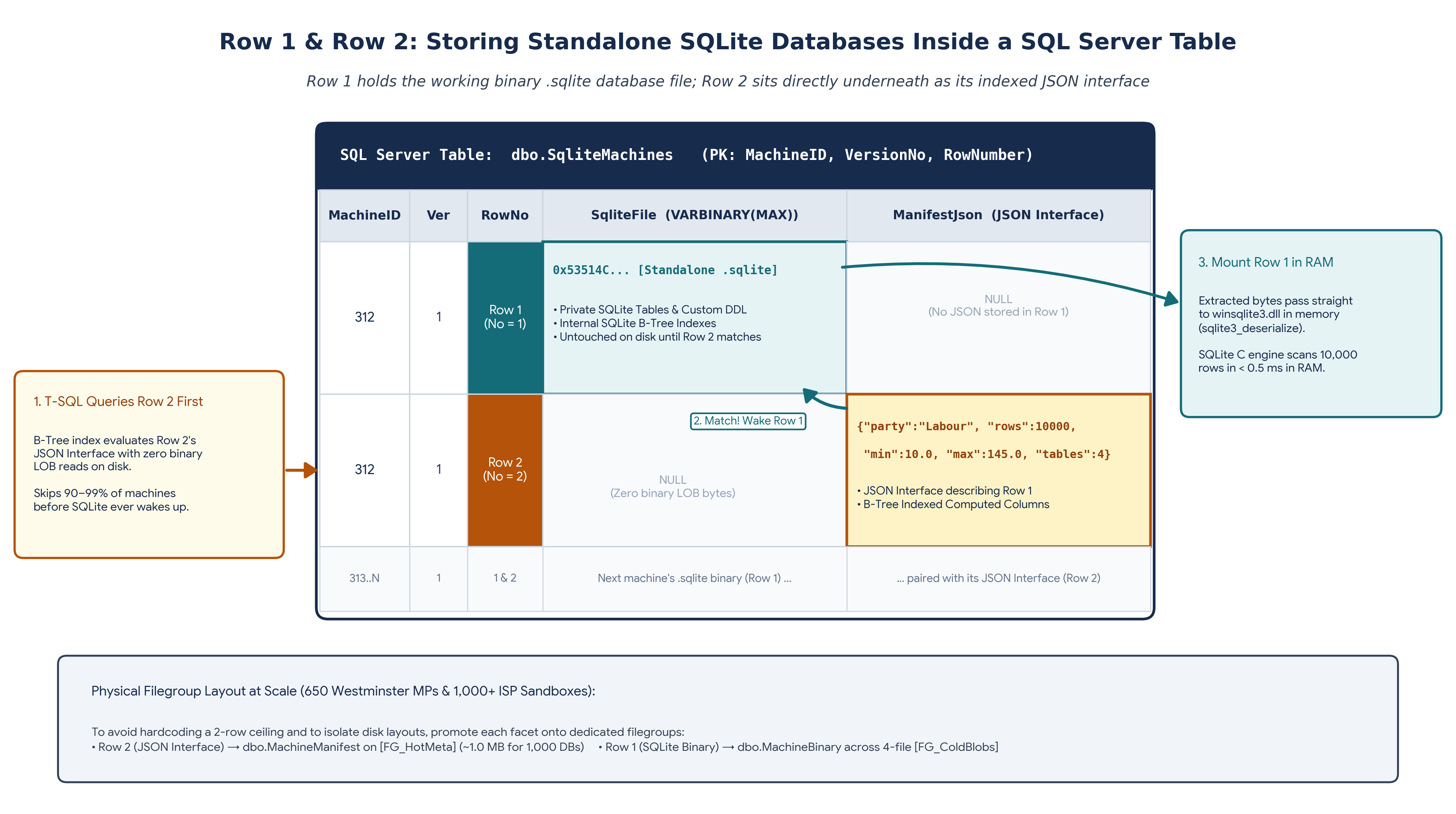 Figure 2: Row 1 stores the working .sqlite binary; Row 2 sits underneath it as an indexed JSON interface.
| Piece | What Sits in the Table | Why It Is There |
|---|---|---|
Row 1 (RowNumber = 1) — SQLite Binary |
A complete standalone .sqlite file in VARBINARY(MAX), with VersionNo and timestamps. |
Holds private tables and SQLite indexes. Can be saved straight to disk as a .sqlite file. Stays cold unless needed. |
Row 2 (RowNumber = 2) — JSON Interface |
A JSON summary of Row 1 (party, row count, min/max scores, table list) with PERSISTED computed columns. |
Exposes normal B-tree indexes over the contents of Row 1 so 90 to 99.5% of rows are skipped without reading blobs. |
MachineDeltaLog & ActiveVersion |
An ordinary relational table for recent inserts/updates/deletes, plus a one-row-per-machine version pointer. | Absorbs live writes without rewriting the binary blob, and rolls back cleanly by flipping ActiveVersion. |
One Table or Split Tables Across Filegroups?
Someone always asks whether keeping Row 1 and Row 2 in the same table means your tiny JSON lookups share physical files with your multi-gigabyte binary blobs. In SQL Server, you can split a single table across different filegroups and separate NVMe drives in three standard ways: put a PARTITION SCHEME on RowNumber so Row 1 lands on [FG_ColdBlobs] and Row 2 lands on [FG_HotMeta]; keep small bounded JSON in-row with TEXTIMAGE_ON [FG_ColdBlobs]; or build a filtered covering index (WHERE RowNumber = 2) on [FG_HotMeta].
Even so, when I built the full test rig I promoted Row 1 and Row 2 into separate tables sharing the same (MachineID, VersionNo) key. Hardcoding CHECK (RowNumber IN (1, 2)) in one table boxes you in. The day you want to add on 384-dimension GPU vectors, security policies, or full-text dictionaries, a single table starts sprouting nullable columns that only apply to one row type. Separate facet tables keep each filegroup clean.
-- Hot metadata filegroup: ~1.00 MB footprint for 1,000 databases
CREATE TABLE dbo.MachineManifest (
    MachineID     INT NOT NULL,
    VersionNo     INT NOT NULL,
    Constituency  VARCHAR(80) NOT NULL,
    Party         VARCHAR(30) NOT NULL,
    ManifestJson  NVARCHAR(MAX) NOT NULL CHECK (ISJSON(ManifestJson) = 1),
    RowCountCold  AS TRY_CAST(JSON_VALUE(ManifestJson, '$.row_count') AS INT) PERSISTED,
    MinScore      AS TRY_CAST(JSON_VALUE(ManifestJson, '$.min_val')   AS DECIMAL(12,2)) PERSISTED,
    MaxScore      AS TRY_CAST(JSON_VALUE(ManifestJson, '$.max_val')   AS DECIMAL(12,2)) PERSISTED,
    CONSTRAINT PK_MachineManifest PRIMARY KEY CLUSTERED (MachineID, VersionNo)
) ON [FG_HotMeta];

-- Hot vector facet on the same filegroup (added later without touching MachineManifest)
CREATE TABLE dbo.MachineVectors (
    MachineID     INT NOT NULL,
    VersionNo     INT NOT NULL,
    ClusterID     INT NOT NULL,
    ClusterTopic  VARCHAR(60) NOT NULL,
    PolicyVector  VECTOR(384) NOT NULL,
    CONSTRAINT PK_MachineVectors PRIMARY KEY CLUSTERED (MachineID, VersionNo)
) ON [FG_HotMeta];

-- Cold binary vault: striped across four pre-sized .ndf files
CREATE TABLE dbo.MachineBinary (
    MachineID     INT NOT NULL,
    VersionNo     INT NOT NULL,
    SqliteFile    VARBINARY(MAX) NOT NULL,
    CONSTRAINT PK_MachineBinary PRIMARY KEY CLUSTERED (MachineID, VersionNo)
) ON [FG_ColdBlobs] TEXTIMAGE_ON [FG_ColdBlobs];
What SQLite Does in RAM (And Three Traps I Walked Straight Into)
I built the test harness on my home workstation (Windows 11 Pro, Intel Core Ultra 9 285K with 24 threads, 192 GB of DDR5 RAM, and WD_BLACK SN850X NVMe drives) across two synthetic workloads: 650 Westminster MP databases holding 10,000 speeches each (6.5 million speeches, 408.8 MB of .sqlite binaries), and 1,000 ISP tenant sandboxes holding 1,000 rows each (78.1 MB of .sqlite binaries, averaging ~78 KB per database, neatly under .NET’s 85 KB Large Object Heap threshold).
Because SQLite itself is public domain, we can look directly at how winsqlite3.dll behaves on an extracted byte buffer in RAM. Four coding choices inside the C# wrapper made all the difference:
| SQLite / C# Technique | Naive First Attempt | Tuned Implementation |
|---|---|---|
| Populating a 10,000-Row SQLite Database in RAM | Calling sqlite3_exec() with formatted SQL text per row (~53.8 ms per 10k-row SQLite image in C). |
Single BEGIN/COMMIT with sqlite3_prepare_v2 + sqlite3_bind_* (~12.4 ms per 10k-row SQLite image; 4.3x faster). |
| Reading Aggregates From a Clean SQLite Image | Marshalling thousands of matching rows out through IEnumerable (~1.85 ms per 10k-row SQLite image). |
Pushing COUNT, MIN, and MAX inside SQLite’s C engine via SummarySpeechesBlob (~0.42 ms per SQLite image). |
| Passing Candidate Keys in T-SQL | Selecting SqliteFile into a @Candidates table variable, causing triple LOB worktable copies in tempdb. |
Storing only 4-byte integer (MachineID, VersionNo) keys in #Candidates before joining MachineBinary (0 KB tempdb LOBs). |
| Multi-Core SQLite Creation Concurrency | 24 threads calling sqlite3_malloc64 simultaneously, queueing on Windows’ default process heap lock. |
Batching bulk SQLite builds at moderate thread counts (or building .sqlite files externally in Python workers). |
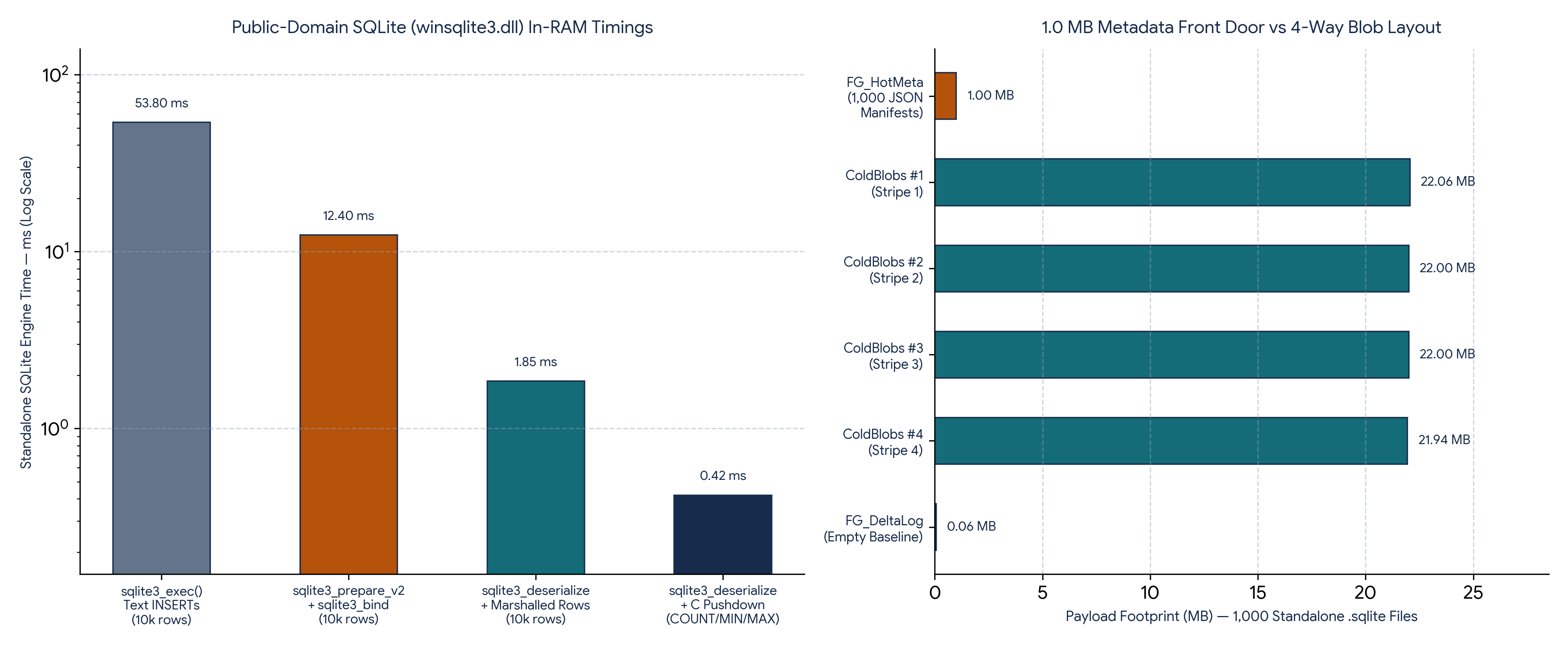 Figure 3: Standalone winsqlite3.dll in-memory operation times (left), and physical space allocation across filegroups for 1,000 tenant databases (right).
Even without publishing host engine stopwatch tables, three bugs I hit while developing the harness stood out.
The first was a scalar UDF trap during database generation. My initial build query called CreateHansardDb() inside a CROSS APPLY and then referenced b.Blob three times in the outer SELECT list (once for the binary insert, once for DATALENGTH, and once to extract the JSON summary). Unless the optimiser decides to insert a spool operator, referencing a scalar CLR expression three times can build every SQLite database three times over. Materialising the generated blobs once before reading their metadata cured it, though throwing all 24 CPU threads at winsqlite3.dll’s memory allocator at the exact same instant immediately taught me about C-runtime heap lock contention inside a shared process.
The second was a bug in my synthetic test data. I assigned parties using (MachineID % 4) + 1 while only giving high speech scores (145.0) to even-numbered IDs (2, 10, 20…). Under modulo 4, even numbers only ever land on slots 1 and 3 (Labour and LibDem), making a high-scoring Conservative MP mathematically impossible in my test data.
The third was watching physical filegroup geometry do its job cleanly. Across 1,000 standalone customer sandboxes, all 1,000 JSON manifests sat inside 1.00 MB on FG_HotMeta, while proportional fill balanced the cold SQLite files across the four ColdBlobs .ndf files at 22.06 MB, 22.00 MB, 22.00 MB, and 21.94 MB.
Bringing the RTX 5090s In Without Risking the Host Process
My personal rule for AI and non-deterministic tooling is simple: if it doesn’t matter, enjoy; if it matters, avoid. What I certainly do not want is NVIDIA CUDA libraries or Python model weights loaded inside sqlservr.exe, where one bad driver update can bring down the database service. On the other hand, using local GPUs to embed 6.5 million speeches into topic vectors so you can spot which MPs talk about North Sea grid storage is genuinely useful, because the final speech counts still come out of deterministic SQLite queries.
To keep a barrier between the two, I run a small local Python FastAPI worker (SQLVOS) on https://127.0.0.1 talking to the two RTX 5090s. SQL Server 2025 calls that localhost endpoint over HTTPS via CREATE EXTERNAL MODEL and AI_GENERATE_EMBEDDINGS when embedding a search prompt, while pre-computed 384-dimension constituency vectors sit in dbo.MachineVectors on [FG_HotMeta]. If Python or CUDA ever falls over, the database engine just logs a failed local HTTP call and carries on.
Storing all 650 x 384 floats (249,600 numbers) in dbo.MachineVectors moved FG_HotMeta from 1.00 MB up to 2.19 MB. You do not need a benchmark chart to see why the geometry works: the entire House of Commons’ JSON manifests, party/score columns, and 384-dimension topic vectors fit inside 2.19 MB of RAM, guarding 408.8 MB of cold SQLite files.
| Filter Stage (650 MPs = 6,500,000 Speeches) | SQLite DBs Mounted | Cold Vault Unpacked | Speeches Returned |
|---|---|---|---|
| 1. Unfiltered Parliament (Mount every MP) | 650 of 650 (100%) | 408.8 MB | 48,952 speeches |
2. Scalar Manifest Filter (MaxScore >= 135) |
66 of 650 (10.2%) | 41.5 MB (89.8% skipped) | 48,952 speeches |
3. Vector + Score (Cosine < 0.10 & Score >= 135) |
13 of 650 (2.0%) | 8.2 MB (98.0% skipped) | 9,896 speeches |
4. Vector + Party ('Conservative') + Score |
3 of 650 (0.46%) | 1.9 MB (99.5% skipped) | 2,237 speeches |
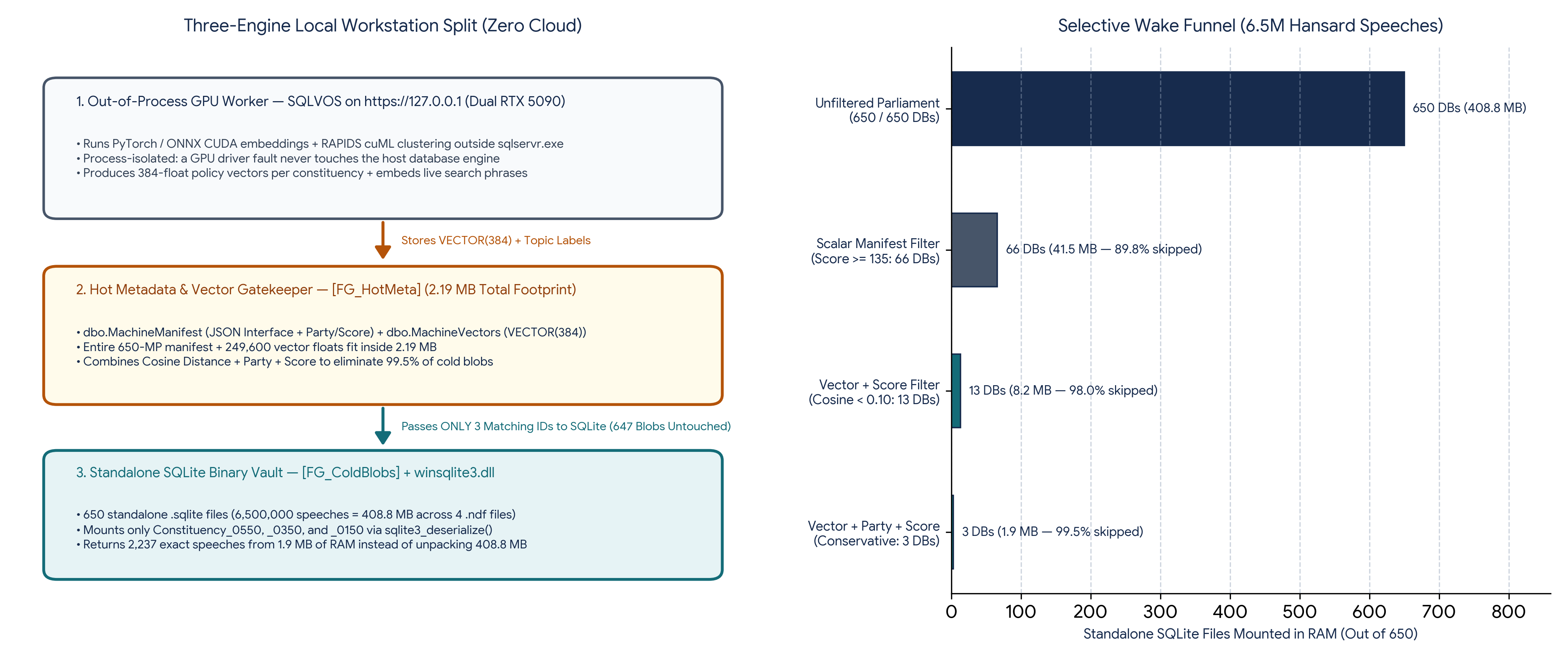 Figure 4: Keeping GPU work out-of-process on 127.0.0.1 (left), and pruning 650 standalone SQLite files down to 3 before deserialisation (right).
On Stage 4 (once I fixed my modulo party formula so Conservatives existed in the test set), combining cosine distance under 0.10 with Party = ‘Conservative’ and MaxScore >= 135.0 eliminated 647 databases without touching cold storage. Only Constituency_0550, Constituency_0350, and Constituency_0150 (1.9 MB in total) were passed to winsqlite3.dll in RAM, where SQLite counted all 2,237 matching speeches in a couple of milliseconds in pure C.
Couldn’t You Just Use One Table?
If all 650 MPs have the exact same four columns on one machine, nobody needs custom tables per tenant, and nobody ever wants to download an individual MP’s database, do not build any of this. Put the 6.5 million rows in one ordinary relational table with a sensible index, run GROUP BY, and job done. Native set-based scans will beat deserialising 650 SQLite blobs every day of the week.
Where standalone SQLite rows are useful is when each row genuinely needs to be its own little computer. This is what is happening in the industry right now. Cloudflare D1 and Turso (recently picked up by Supabase) have built whole platforms around giving every customer or AI project its own SQLite database, because schema isolation and instant file portability are wonderful things to have. Their headache is the opposite of ours: once you scatter 10,000 SQLite files across object storage without an enterprise relational database sitting over them, running one analytical query across all 10,000 tenants turns into a thousand HTTP requests.
People also run Canonical’s dqlite or rqlite on those neat mini-ITX carrier boards that hold five Raspberry Pi Compute Modules. Those solve a different problem altogether: they copy one small SQLite database across five Pi boards over a 1 Gbps switch so the cluster survives somebody pulling a power lead out. Inside one workstation with 192 GB of RAM, we are not copying one database five times over Ethernet; we are federating 1,000 different standalone databases in memory.
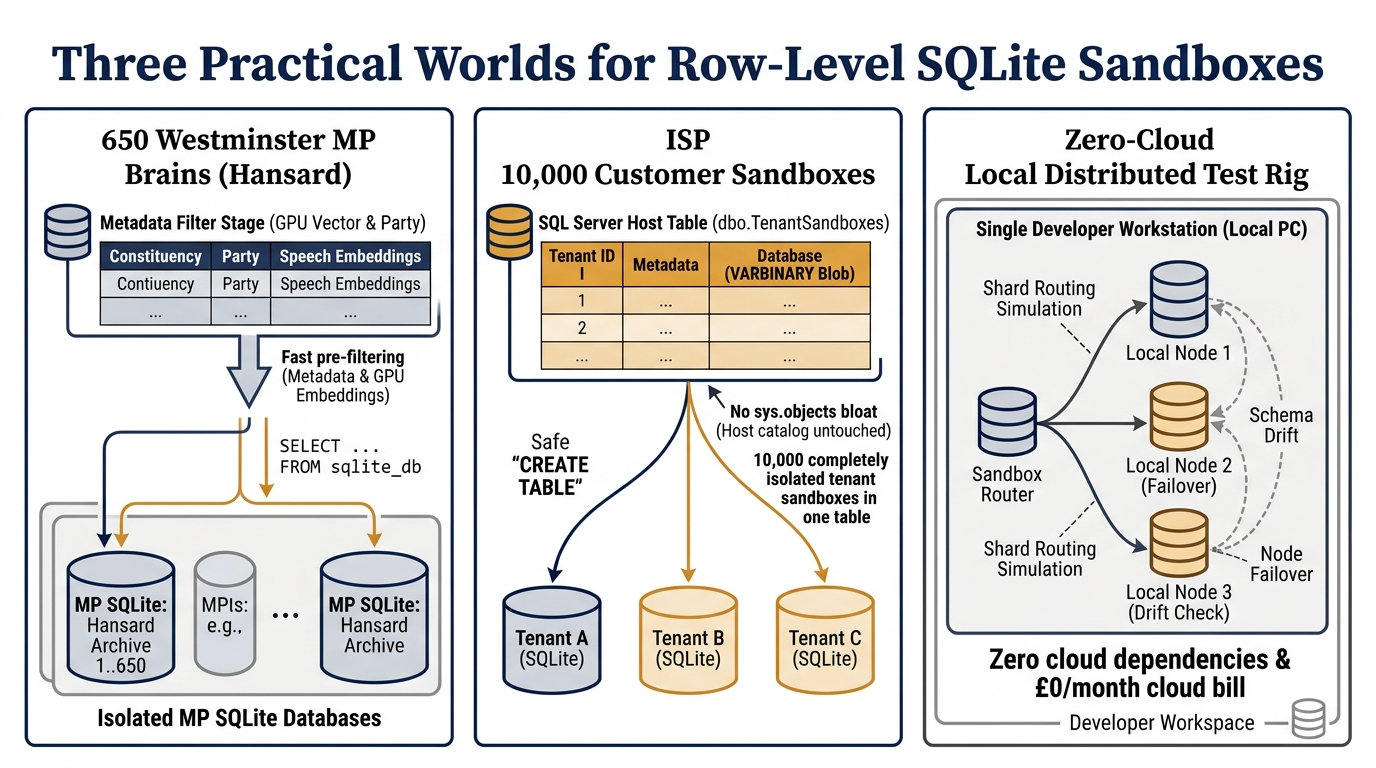 Figure 5: Three places where standalone SQLite rows inside SQL Server actually make sense.
That leaves three jobs where this pattern works: a parliamentary or investigative archive where you can filter the whole country on the host box yet still let any reader download Constituency_0350.sqlite to inspect the dataset on their own laptop; an ISP or SaaS host giving 10,000 customers genuine DDL freedom inside sealed sandboxes while only backing up one host database; and a zero-cloud local test rig where you can rehearse rolling schema upgrades across 500 shards and it won’t incur any cloud costs.
Thirty years after iaFramework, I do enjoy watching what a single machine and a relational engine will do if you stop putting layers of services in the way. Four hundred megabytes of standalone parliamentary databases, a two-megabyte index and vector front door, three tiny SQLite files unpacked in RAM to get the answer, and not a Kubernetes pod in sight.
Responses
Comment with a free GitHub account, or use the form below to send Trevor a private note.