I Built My Head Out of Lego. Inside SQL Server 2025.
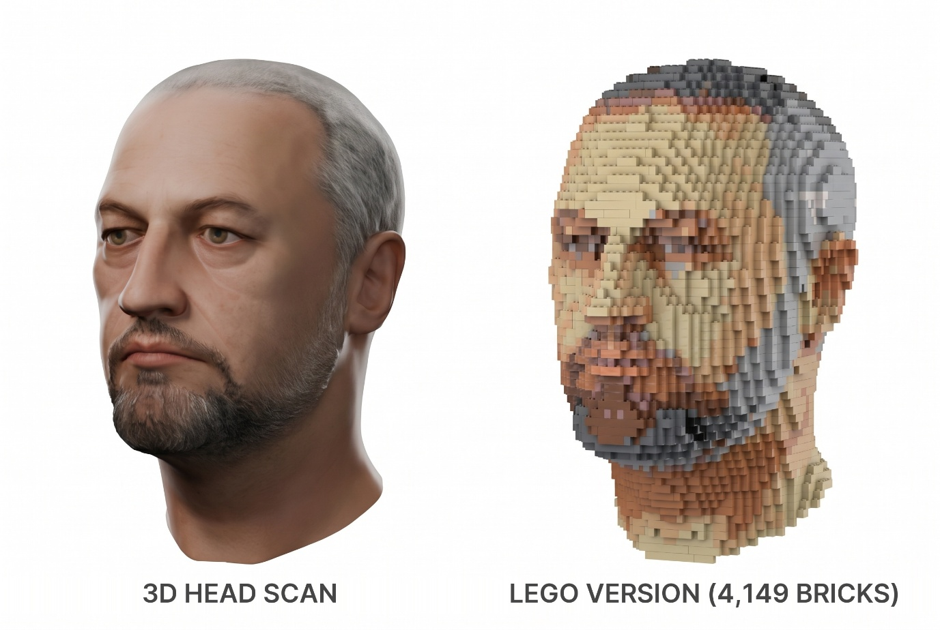 The money shot: the 3D scan on the left, me in Lego on the right. 4,149 bricks in 13 colours, designed from start to finish by SQL Server 2025.
 I could predict the comments if I didn’t give it a brain
The last time my head went into SQL Server it came out lopsided, 6,000 metres tall and with a stunt rear head. If you missed it, that was the Relational Space Carving article, and I finished it by promising you robot eyes and the beginning of a cloning process.
The robot eyes are still in a drawer.
Another time I tried to render my head so that I could create a Metahuman and please do not ask me how this happened, but this came out…
 I have no words really, but I think its something to do with an unclosed mesh.
Instead, I asked myself a much simpler question. Is there any clever maths behind Lego?
I was expecting the answer to be “not really, it’s plastic”. It turns out there is, and nearly all of it is something a relational database is already very good at. So, the plan became: store Lego bricks in SQL Server, build something simple, then build something hard. And the hardest thing I could think of was me.
I approached the next section from two directions:
Create from a simple front-facing photo
I feed a standard 2D photograph of my own face into SQL Server 2025 and have pure T-SQL sculpt, colour-match, hollow out, interlock, and export a life-size, physically buildable 3D Lego bust.
No Python. No C#. No external mesh slicers. Just an uncompressed bitmap, and a relational schema
Create from an existing OBJ file
Create the Lego head from an existing 67 MB OBJ of my head. Everything that follows (loading it, turning it into bricks, colouring it and writing out a file Lego’s own design software can open) runs in T-SQL on SQL Server 2025.
How it was done
Option 2
The Lego grid is all integers, if you pick the right unit
A Lego stud is 8 mm from the next one. A brick is 9.6 mm tall. A plate is 3.2 mm, a third of a brick.
The bit I love is this. Five plates stacked up is 16 mm, which is exactly two studs. That 5:2 ratio is why you can build sideways (“studs not on top”, if you’re a proper adult fan of Lego) and everything still lines up.
For a database person that’s wonderful news. Store X and Z in studs and Y in brick layers and every coordinate is an integer. No floating point, no tolerances, and every “does this touch that?” question becomes an equality join. LDraw, the open file format the whole Lego CAD world runs on, does the same thing: 20 units per stud, 24 per brick, 8 per plate.
There’s one trap, and I nearly fell straight into it. A 1×1 brick is not a cube. It’s 8 × 8 × 9.6 mm. Chop a model into cubes, call each one a brick, and your head comes out 20% too tall. Mine is long enough already and the first time I did this I looked like the statues on Easter Island.
Two 2×4 bricks, 24 ways, and Burnside’s lemma
The most famous bit of Lego maths is counting. How many ways can you join six 2×4 bricks? Lego quoted roughly 103 million for years. Then in 2005 a mathematician, Søren Eilers, actually counted them properly: 915,103,765.
Six is far too many to brute-force in a query. Two is perfect, though, and it’s a lovely bit of maths.
Fix the bottom brick. Slide the top brick over it, either parallel or turned 90 degrees, keeping at least one stud in contact. That gives 46 positions. But spin the whole thing round 180 degrees and some of those positions turn into each other, so they aren’t different builds.
Burnside’s lemma says the number of genuinely different builds is the average number of positions each rotation leaves unchanged. Doing nothing leaves all 46 alone. The 180-degree turn leaves only the 2 positions that are dead centre. (46 + 2) / 2 = 24.
WITH TopBrick AS
(
    SELECT w = 2, l = 4             -- parallel
    UNION ALL SELECT 4, 2           -- turned 90 degrees
),
Placement AS
(
    SELECT b.w, b.l, dx = x.value, dz = z.value
    FROM TopBrick AS b
    CROSS JOIN GENERATE_SERIES(-3, 3) AS x
    CROSS JOIN GENERATE_SERIES(-3, 3) AS z
    WHERE x.value < 2 AND x.value + b.w > 0     -- the footprints overlap in X...
      AND z.value < 4 AND z.value + b.l > 0     -- ...and in Z
)
SELECT RawPlacements  = COUNT(*),
       FixedBy180     = SUM(IIF(2 * dx + w = 2 AND 2 * dz + l = 4, 1, 0)),
       DistinctBuilds = (COUNT(*) + SUM(IIF(2 * dx + w = 2 AND 2 * dz + l = 4, 1, 0))) / 2
FROM Placement;
RawPlacements FixedBy180 DistinctBuilds
- - - - - - - - - - - - - - - - - - - - -
46 2 24Have a look at that WHERE clause. “Do these two bricks overlap?” is exactly the “do these two date ranges overlap?” test every SQL developer has written a hundred times, once for each direction. That turns out to be the theme of this whole article. Lego problems keep turning into SQL problems we already know.
Something simple first. Or not.
My original plan was a little Lego minifigure first, then my head. Then I realised a minifigure isn’t brick-built at all. It’s a handful of moulded parts, so there’s nothing to calculate. The classic six-brick duck (which ties in nicely with those 915 million) or a Benchy would be better, and they’re coming next time.
The next time is when I create a complete 3D Printer Slicer sending directly to a PRUSA CORE ONE filament printer, again all in Transact-SQL.
I went straight for the head. Of course I did.
Loading a 67 MB OBJ file with STRING_SPLIT
An OBJ file is just text:
v  -0.089426 0.033380 -0.017880 <- a vertex
vt  0.074025 0.377586           <- a texture coordinate
f   1/1/1    2/2/2     3/3/3    <- a triangle: vertex/texture/normal
The catch is that faces point at vertices by their position in the file. The first `v` line is vertex 1, the second is vertex 2, and so on. So, line order matters, and `BULK INSERT` into a table doesn’t promise you the order. `STRING_SPLIT` with its `enable_ordinal` argument does:
SELECT @doc = BulkColumn
FROM OPENROWSET(BULK 'D:\_Articles\lego\Trevor_3d_Head3.obj', SINGLE_CLOB) AS f;

SELECT LineNum = s.ordinal, Line = s.value
INTO #Line
FROM STRING_SPLIT(@doc, CHAR(10), 1) AS s          -- the 1 switches on the ordinal
WHERE s.value LIKE 'v %' OR s.value LIKE 'vt %' OR s.value LIKE 'f %';

/* the nth "v" line is vertex n */
INSERT obj.Vertex (MeshID, VertexID, X, Y, Z)
SELECT @MeshID,
       ROW_NUMBER() OVER (ORDER BY l.LineNum),
       CAST(REGEXP_SUBSTR(l.Line, '\S+', 1, 2) AS float),
       CAST(REGEXP_SUBSTR(l.Line, '\S+', 1, 3) AS float),
       CAST(REGEXP_SUBSTR(l.Line, '\S+', 1, 4) AS float)
FROM #Line AS l
WHERE l.Line LIKE 'v %';
That’s `REGEXP_SUBSTR`, new in SQL Server 2025, pulling the 2nd, 3rd and 4th words out of each line.
My first run failed instantly. I had called the line-number column `LineNo`, and it turns out `LINENO` is a reserved word in T-SQL. Thirty years, and I never knew. Later, I did exactly the same thing by calling a variable `by`. Also reserved. Obviously.
Second run: 343,220 vertices and 686,435 triangles in 28 seconds.
My head is in metres, Y is up and my face points along +Z. It measures 18 × 29 × 24 cm. That’s including the neck, I should add.
Is my head watertight? Euler’s formula is a GROUP BY
Before you turn a mesh into bricks you want to know it’s a closed surface. No holes for the inside to leak out of.
There’s a lovely bit of 18th-century maths for this. For anything shaped like a sphere,
V − E + F = 2
vertices, minus edges, plus faces. That’s Leonhard Euler. And in a watertight mesh every edge is shared by exactly two triangles.
Both checks are a `GROUP BY`:
WITH Edge AS
(
    SELECT A = LEAST(e.A, e.B), B = GREATEST(e.A, e.B)
    FROM obj.Face AS f
    CROSS APPLY (VALUES (f.V1, f.V2), (f.V2, f.V3), (f.V3, f.V1)) AS e(A, B)
)
SELECT A, B, Uses = COUNT(*)      -- 1 = the edge of a hole, 2 = fine, 3+ = something weird
FROM Edge
GROUP BY A, B;
V E F BoundaryEdges NonManifoldEdges Euler
343220 1029653 686435 2 1 2Euler says 2. Two edges out of just over a million belong to only one triangle. I’ll take that.
Turning my head into bricks is a window function
Here’s the core idea. It’s the same idea my 3D printers’ slicer uses to fill in each layer.
Fire a ray straight through my head along every row of the brick grid. Each time the ray crosses the surface it goes outside → inside → outside → inside. Sort the crossings along the ray, pair them up (1st with 2nd, 3rd with 4th) and everything between a pair is solid head.
Finding where a ray hits a triangle is barycentric coordinates in a `CROSS APPLY`. Pairing the crossings up is `ROW_NUMBER()` and `LEAD()`, and filling in the bricks between them is `GENERATE_SERIES`:
WITH Ray AS
(
    SELECT j, k, t,
           n    = ROW_NUMBER() OVER (PARTITION BY j, k ORDER BY t),
           tOut = LEAD(t)      OVER (PARTITION BY j, k ORDER BY t),
           Hits = COUNT(*)     OVER (PARTITION BY j, k)
    FROM #Hit
)
INSERT lego.Voxel (ModelID, X, Y, Z)
SELECT @ModelID, i.value, r.j, r.k
FROM Ray AS r
CROSS APPLY GENERATE_SERIES(CAST(CEILING(r.t) AS int), CAST(FLOOR(r.tOut) AS int), 1) AS i
WHERE r.n % 2 = 1                -- entering the solid
  AND r.Hits % 2 = 0             -- a ray that leaks through a hole is skipped
  AND CEILING(r.t) <= FLOOR(r.tOut);
One subtle thing. If a ray passes exactly through a vertex or along an edge it gets counted twice, and inside and outside swap places. So, I nudge every ray about a micron off the exact grid. After that, any ray with an odd number of crossings must have leaked through a hole, and it gets skipped.
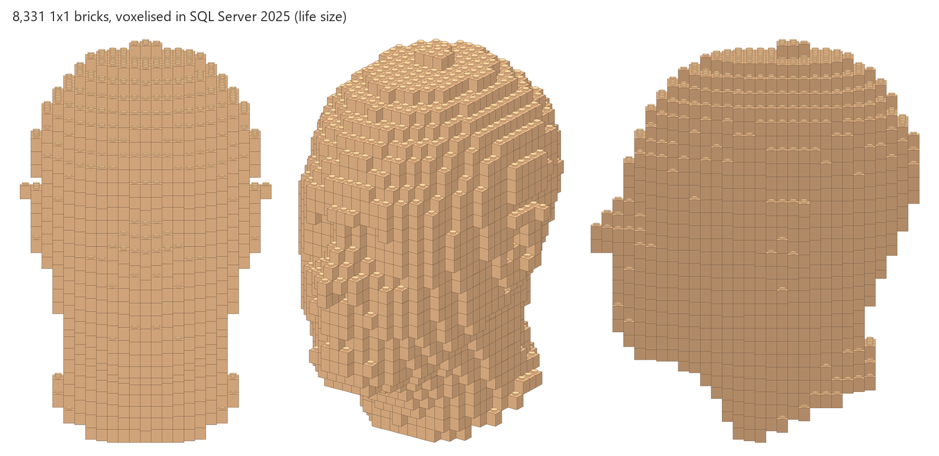
At life size: 619 rays, 1,256 crossings, zero odd rays, in under a second. Out came 8,331 1×1 bricks on a 23 × 31 × 30 grid.
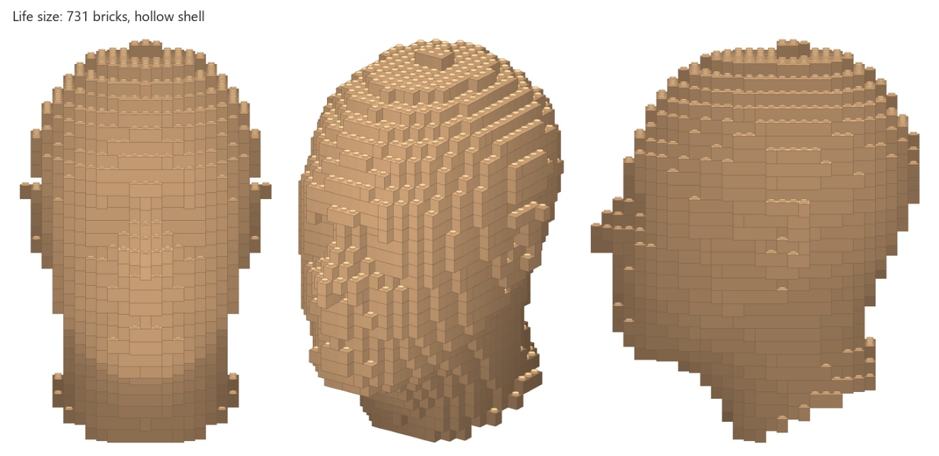 8,331 1×1 bricks. You can already see the ears, the nose in profile and the flared neck cut.
Hollowing my head: peel the onion
Nobody builds a solid Lego head. You build a shell.
So, every brick gets a Depth. Depth 1 is any brick touching empty space. Depth 2 is any brick touching a Depth 1, and so on. A WHILE loop peels the onion one layer at a time until nothing changes. Mathematically it’s a discrete distance transform. In SQL it’s an `UPDATE … WHERE EXISTS` over six neighbour offsets.
My head is 11 layers deep at the thickest point (insert your own joke here). A hollow shell two studs thick is simply `WHERE Depth <= 2`: 3,340 bricks instead of 8,331.
Merging bricks is the date-range overlap query
3,340 1×1 bricks would be miserable to build and wouldn’t hold together. Real Lego sculptures use 2×4s, 2×8s, 1×3s and so on.
So, it goes biggest part first. Find every spot where a 2×8 fits, with all its cells free and the same colour. Those candidates overlap each other, so in each round I keep only the ones that no better-ranked candidate overlaps. The best candidate on each layer always wins, so every round makes progress. In graph theory that’s building a maximal independent set in rounds. In SQL it’s the date-range query again, once per axis:
SELECT ...
FROM #Cand AS c
WHERE NOT EXISTS (SELECT 1
                  FROM #Cand AS o
                  WHERE o.Y = c.Y AND o.Pri < c.Pri
                    AND o.X < c.X + c.SizeX AND c.X < o.X + o.SizeX
                    AND o.Z < c.Z + c.SizeZ AND c.Z < o.Z + o.SizeZ);
Even layers prefer bricks running across, odd layers prefer bricks running front to back. That way the joints in one layer are always covered by the bricks above. Proper brickwork bond, like a garden wall.
15 rounds, half a second, 731 bricks. Then I checked it the way you should check anything you’re proud of: zero overlapping bricks, zero missing cells, zero extra cells.
Life size, 731 bricks, hollow. In the side view you can see the alternating layers.
Getting it out: LDraw is a SELECT
LDraw is a text format with one line per brick: colour, position, a 3×3 rotation matrix and the part number. `3001.dat` is the classic 2×4.
CONCAT('1 ', b.ColourID, ' ',
       (2 * b.X + b.SizeX - 2 * c.cx) * 10, ' ',          -- x: centre of the footprint
       -(b.Y - c.y0 + 1) * 24, ' ',                       -- y: top of the layer (Y is down)
       -(2 * b.Z + b.SizeZ - 2 * c.cz) * 10, ' ',         -- z: flipped so the face is at the front
       IIF(b.SizeX >= b.SizeZ, '1 0 0 0 1 0 0 0 1',       -- long side along X as drawn...
                               '0 0 1 0 1 0 -1 0 0'),     -- ...or turned 90 degrees
       ' ', b.PartID, '.dat')
0 Trevor head (2x life size)
0 Author: LegoSQL on SQL Server 2025
1 19 -20 -24 -70 1 0 0 0 1 0 0 0 1 3008.dat
1 19 90 -24 -70 1 0 0 0 1 0 0 0 1 3622.dat
0 STEPA couple of gotchas. LDraw’s Y axis points *down*, and a brick’s origin is the centre of its top face. Flipping Y and Z together gives you a 180-degree turn rather than a mirror image. Mirror-image me would be very unsettling.
Put a `0 STEP` line after each layer and the file should become layer-by-layer building instructions in BrickLink Studio, for free. (Spoiler: it does. More on that at the end.)
Life size was a disappointment
At life size my face is only 23 studs across, so the features are just one or two bricks deep. It’s a head. It isn’t obviously *my* head.
So: `@Scale = 2.0`. That gives 66,645 voxels on a 45 × 61 × 60 grid, a 14,544-cell shell and 2,969 bricks, in about 3 seconds. Brow, eye sockets, nose, mouth, chin and ears all come through.
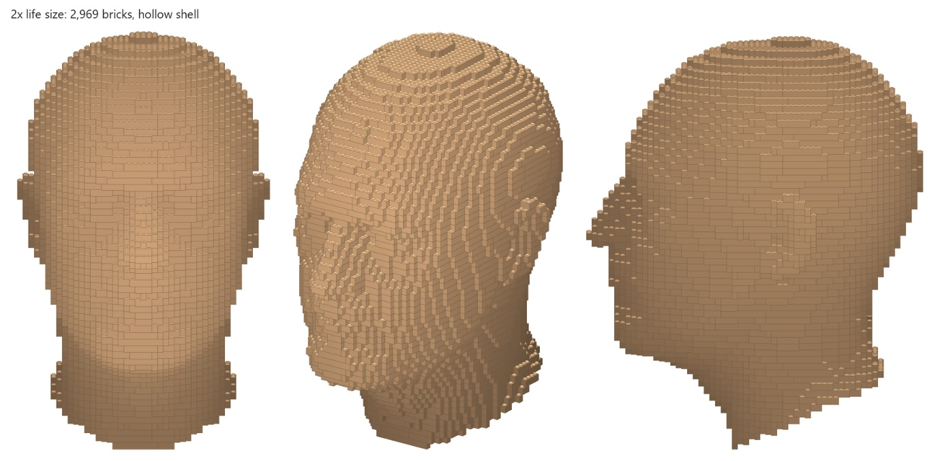 2× life size, before colour. The three-quarter view is where it starts to look like me.
Colour: the texture that wasn’t there
The OBJ pointed at a material file that wasn’t in the folder. When I found it, it had no texture in it at all. The colour lived in the original Blender file, with four images packed inside it: the 4096 × 4096 Base Colour map, plus a metallic/roughness map, a normal map and an emission map.
Getting it out cost me five minutes of staring at a Blender process that had used five seconds of CPU and was doing absolutely nothing. Running it headless with ` — factory-startup -noaudio` sorted that out. This is the one step outside SQL Server I had to take: a tiny Blender script finds whatever image feeds Base Colour and saves it as a 1024 × 1024, 24-bit BMP.
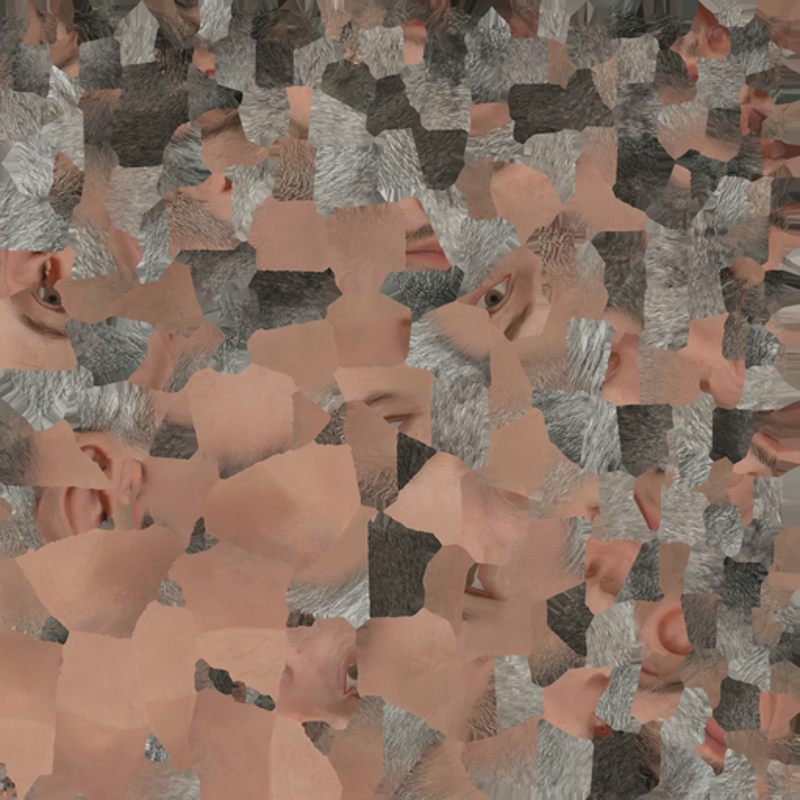 My face as a texture atlas. A patchwork quilt of skin, stubble and the occasional eyeball.
A BMP is just SUBSTRING (again)
If you read the Space Carving article, you’ll know I’ve been here before. You’ll also know about my 32-bit alpha channel disaster. This time it’s 24-bit. I learned my lesson.
SQL Server can’t decode a JPEG or a PNG. But a 24-bit BMP is just a 54-byte header followed by raw pixels: bottom row first, three bytes each, stored Blue-Green-Red, with each row padded out to a multiple of 4 bytes. So `OPENROWSET(… SINGLE_BLOB)` plus `SUBSTRING` is a perfectly good image decoder:
DECLARE @Stride int = (@W * 3 + 3) / 4 * 4;      -- each row is padded to 4 bytes

INSERT obj.Texel (MeshID, PX, PY, R, G, B)
SELECT @MeshID, p.PX, p.PY,
       CAST(SUBSTRING(@bmp, p.Byte0 + 3, 1) AS tinyint),     -- stored B, G, R
       CAST(SUBSTRING(@bmp, p.Byte0 + 2, 1) AS tinyint),
       CAST(SUBSTRING(@bmp, p.Byte0 + 1, 1) AS tinyint)
FROM GENERATE_SERIES(0, @W * @H - 1) AS g
CROSS APPLY (SELECT PX = g.value % @W, PY = g.value / @W) AS xy
CROSS APPLY (SELECT xy.PX, xy.PY, Byte0 = @Offset + xy.PY * @Stride + xy.PX * 3) AS p;
1,048,576 pixels in 6 seconds. I spot-checked three of them against Python’s imaging library and they were identical.
Is that actually my face? Checking the UVs
The OBJ had been exported from an earlier version of the Blender file (“Head2”), and the texture came from a later one (“Head3”). If the texture coordinates didn’t match, I’d be painting an ear onto my forehead.
So before trusting anything, I splatted every triangle onto a flat image, coloured from the texture through its UVs.
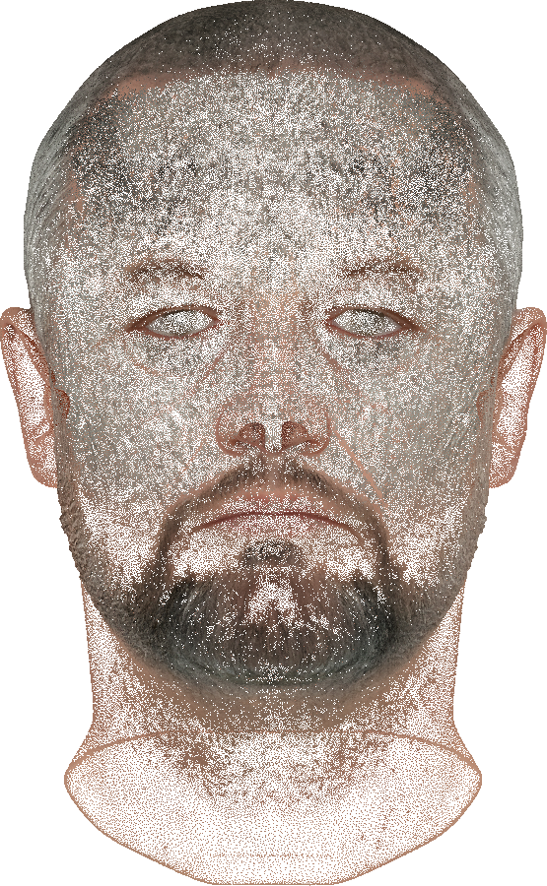 Eyes, nose, beard and ears, all exactly where they should be.
Nearest colour is VECTOR_DISTANCE
Now for the fun part. For every one of the 686,435 triangles:
- its centre’s texture coordinate picks a pixel, which gives a colour
— its centre’s position picks a grid cell, which gives a brick
— its area is the weight
Each brick’s colour is the area-weighted average of all the triangles that land on it, snapped to the nearest real Lego colour.
“Nearest” has to be measured the way eyes see colour, not in RGB, so everything is converted to CIELAB first. And this is where SQL Server 2025 really is necessary. Every Lego colour is stored as a `VECTOR(3)`, and finding the nearest one is just this:
SELECT TOP (1) c.ColourID
FROM lego.Colour AS c
WHERE c.InPalette = 1
ORDER BY VECTOR_DISTANCE('euclidean', c.Lab, @pixel);
That’s a feature Microsoft built for AI embeddings, being used to choose between Medium Nougat and Dark Tan 😊
The first result was… camouflage.
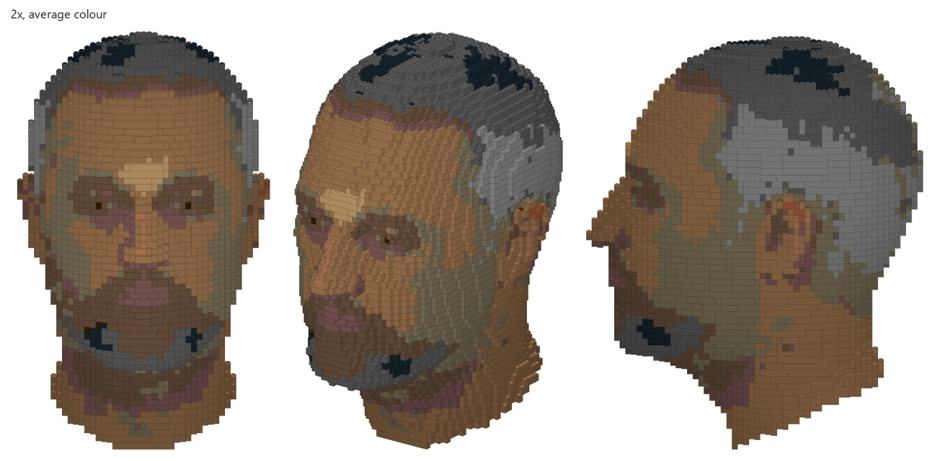 First attempt. Me, in army camouflage.
There were two problems. Stubble averaged with skin came out as Dark Tan, which is a sort of olive green, so my cheeks went military. And my skin was far too dark, because the scan had its lighting baked into the texture. A typical skin pixel was around 48 on the Lab lightness scale. In a photo of the real me it’s nearer 74.
I tried a “dominant colour” mode, where each brick takes whichever Lego colour covers most of its area rather than the average. It’s sharper, but it lost the tiny dark pupils, so I went back to the average.
The real fixes were two parameters:
- A portrait palette. An `InPalette` flag on the colour table. Out go Red, Blue, Yellow and that olive Dark Tan.
— Exposure. Multiply the Lab lightness before snapping to a colour.
Here’s one skin pixel before and after:
Exposure 1.0 Exposure 1.25
Name Distance Name Distance
Medium Brown 8.5 Medium Nougat 13.3
Sand Red 10.3 Nougat 15.6
Medium Nougat 14.8 Medium Tan 17.5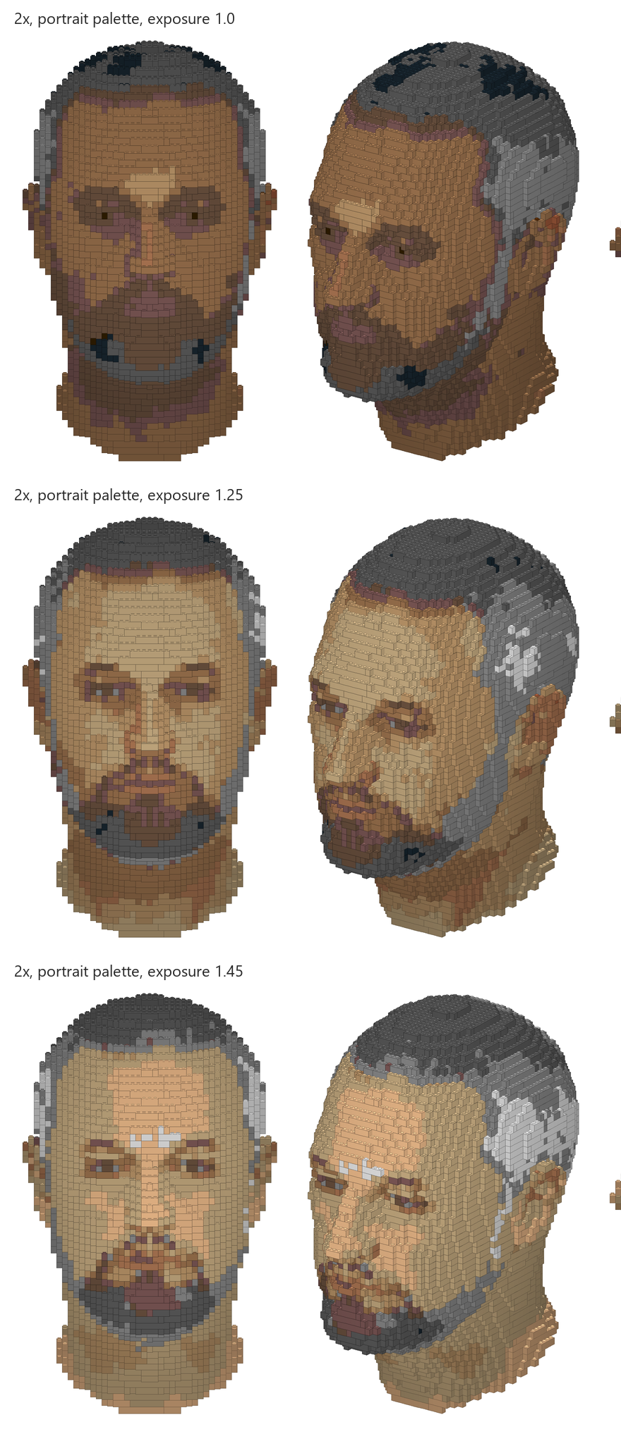 Exposure 1.0, 1.25 and 1.45. At 1.45 my forehead starts turning into white bricks.
So, 1.25 it is. Proper skin tones, eyes with irises, the grey goatee and the grey sides of the buzz cut.
Into BrickLink Studio
Then I did the thing I’d been putting off. I installed BrickLink Studio and opened the file SQL Server had written.
4,149 bricks, each one exactly where a SELECT statement put it, in the right colour and the right way round. And, unlike last time, no head 6,000 metres tall.
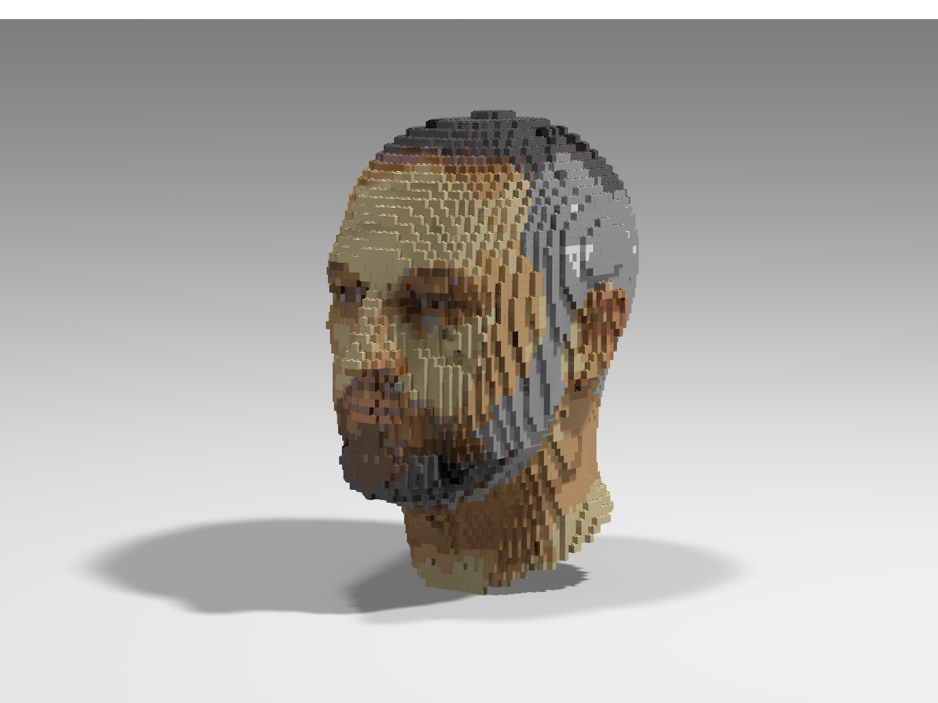 Rendered in BrickLink Studio. Every brick placed by a SELECT statement.
And here’s the build, from the very first brick.
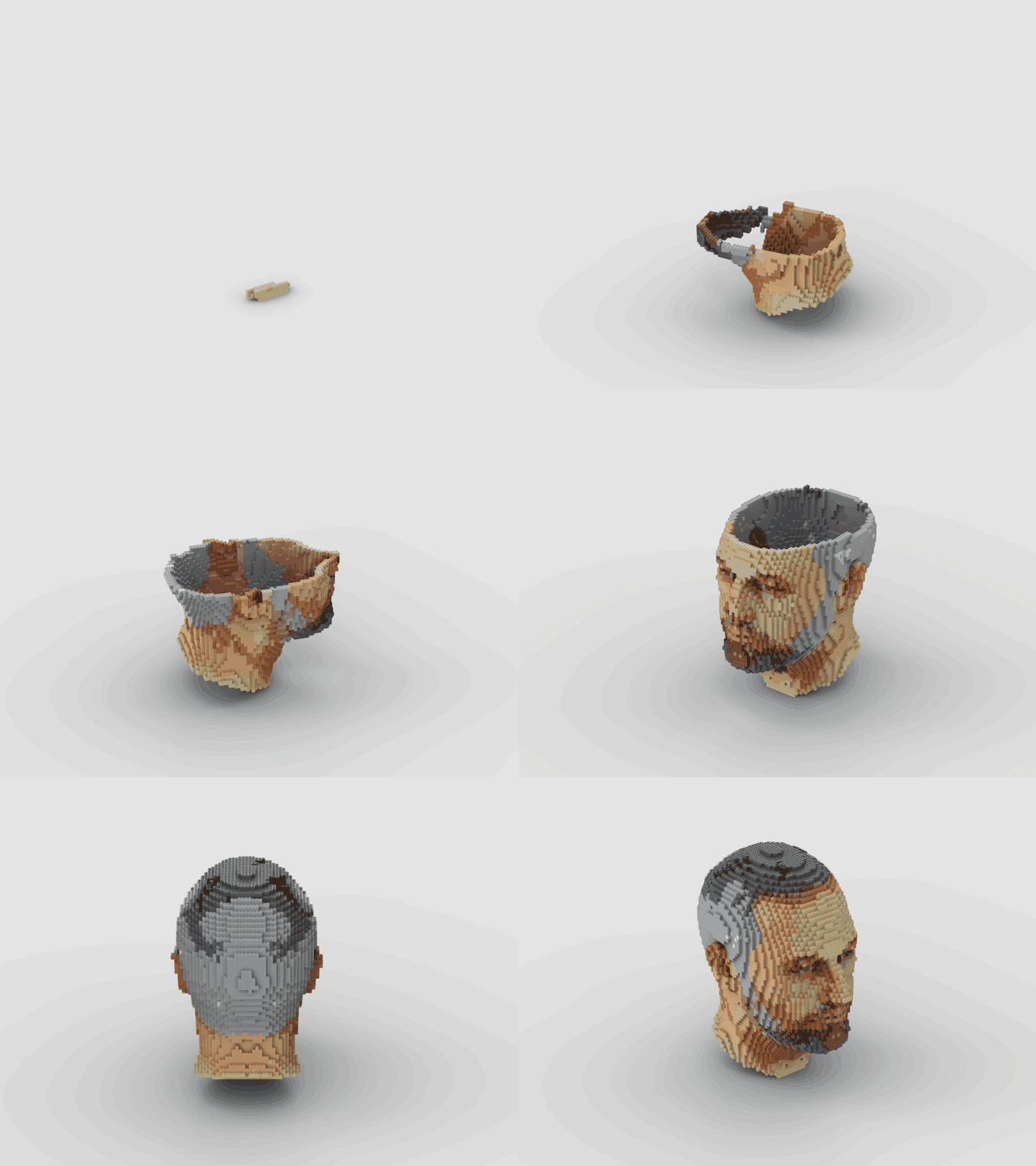
And those `0 STEP` lines? Studio turned them into proper building instructions: 61 steps across 16 pages, one step per layer, with the parts for each layer in a box at the top, exactly like a real Lego manual.
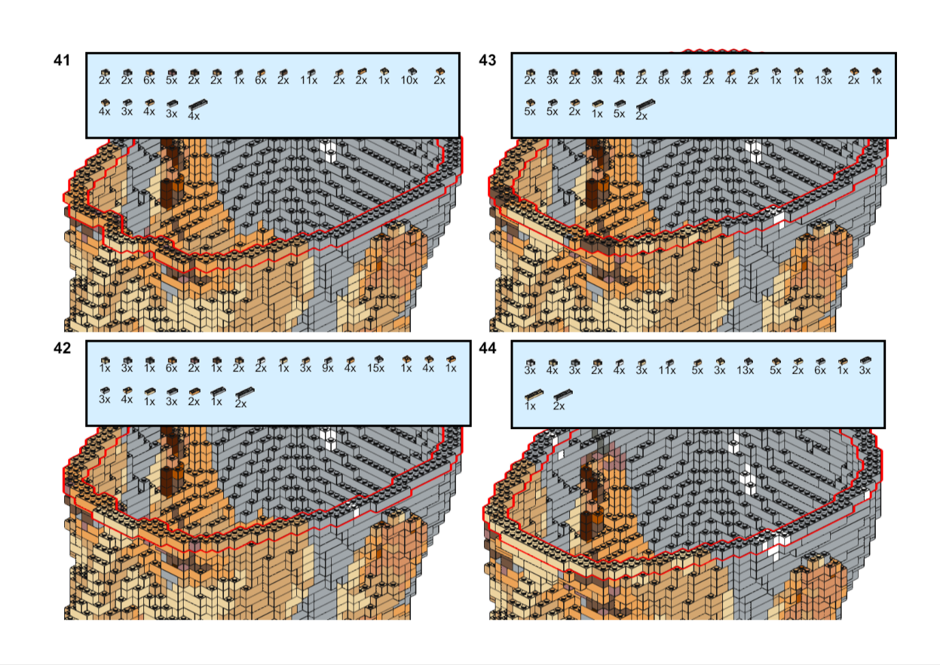 Steps 41 to 44 of 61. SQL Server wrote my building instructions.
The Bill of Materials: What Does My Head Cost on BrickLink?
The greedy mesher compressed 65,204 raw studs down to 15,274 interlocked plates, for an estimated BrickLink total of £576.19
Two statistics jump right out on the Bill of Materials
- The Red Core Savings: Just 1,157 Red 2 × 8 plates swallowed 18,512 individual interior studs inside my cranium — eliminating over 17,000 parts and costing just £23.14.
- The Price of a Salt-and-Pepper Beard: Why are the top three rows of the Bill of Materials dominated by 1 × 1 and 1 × 2 Light and Dark Bluish Gray plates (£239.16 worth of tiny grey pieces)? Because every fleck of grey hair in my beard and temples alternates pixel-by-pixel. The greedy mesher refused to merge adjacent grey and brown voxels into larger plates, preserving the exact dithered texture of the beard.
The one bit I’m not happy with is the chin. On the scan it’s a grey goatee. In Lego it’s a brown patch with a black hole under the jaw. That’s the shadow under my chin, baked into the texture and now faithfully reproduced in plastic. SQL Server did exactly what I asked it to. It always does. That’s the problem.
I have no brain
Then I watched the build animation again and noticed something. About a third of the way in, the camera looks straight down into my head, and there’s nothing there. Two studs of wall and a lot of fresh air.
I’d built myself without a brain. Brian could have told you that.
So, a new plan for a video. Build the head almost to the top. Stop. Rewind back down to about half way. Grow a brain inside. Then close the skull back over it. And, obviously, do the whole thing in SQL Server.
Growing a brain is three ellipsoids and a SQUARE()
A Lego brain, it turns out, is three shapes:
- the cerebrum, a big ellipsoid filling the top of the skull
- the cerebellum, a smaller one tucked in low at the back
- the brain stem, a cylinder that carries on down through my neck as the spinal cord. Turns out I do have a backbone.
Everything is placed relative to my head’s own bounding box (0 to 1 across, up, and front to back), so the same numbers work at any scale. An ellipsoid is just x² + y² + z² ≤ 1 with each axis stretched, so `SQUARE()` did all the anatomy:
CROSS APPLY (SELECT Part = CASE
    WHEN SQUARE((p.u - 0.50) / 0.41) + SQUARE((p.v - 0.74) / 0.19) + SQUARE((p.w - 0.45) / 0.38) <= 1 THEN 'cerebrum'
    WHEN SQUARE((p.u - 0.50) / 0.27) + SQUARE((p.v - 0.57) / 0.08) + SQUARE((p.w - 0.17) / 0.12) <= 1 THEN 'cerebellum'
    WHEN SQUARE((p.u - 0.50) / 0.07) + SQUARE((p.w - 0.29) / 0.05) <= 1 AND p.v BETWEEN 0.07 AND 0.62 THEN 'stem'
    END) AS s
WHERE h.ModelID = @HeadModelID
  AND h.Depth > 2 + @Gap              -- inside the 2-brick skull, plus a gap
Remember the onion peel? It pays off again here. “Inside my skull” is simply `Depth > 2`, and I leave one more empty layer between skull and brain. That gap is my cerebrospinal fluid. Technically it’s air, but it’s air with a medical name.
The folds are where it got interesting. A smooth pink blob doesn’t say “brain”. Wrinkles do. So, I made a wiggly 3D wave (three sine waves, each one wobbled by another) and cut a groove wherever it crosses zero.
My first attempt said, “close to zero counts”, and it came out as a pink blob with a rash. Scattered speckles, no lines. The wave changes faster than one brick, so a “near zero” test skips straight over cells. The fix is to ask a better question: *is the wave positive here and negative next door?* That gives an unbroken line one brick wide, every time:
WHERE v.Depth = 1                                              -- surface bricks only
  AND lego.BrainWave(v.X, v.Y, v.Z, @Scale, @k) >= 0           -- positive here...
  AND EXISTS (SELECT 1
              FROM (VALUES (1,0,0), (-1,0,0), (0,1,0), (0,-1,0), (0,0,1), (0,0,-1)) AS d(dx, dy, dz)
              WHERE lego.BrainWave(v.X + d.dx, v.Y + d.dy, v.Z + d.dz, @Scale, @k) < 0)   -- ...negative next door
The bricks exposed at the bottom of each groove turn Dark Pink, there’s a slot down the middle between the two halves, and the stem is Light Pink. All three colours are flagged `InPalette = 0`, so no query will ever decide my cheeks are Dark Pink.
2,287 bricks of brain: 1,409 Pink, 711 Dark Pink and 167 Light Pink.
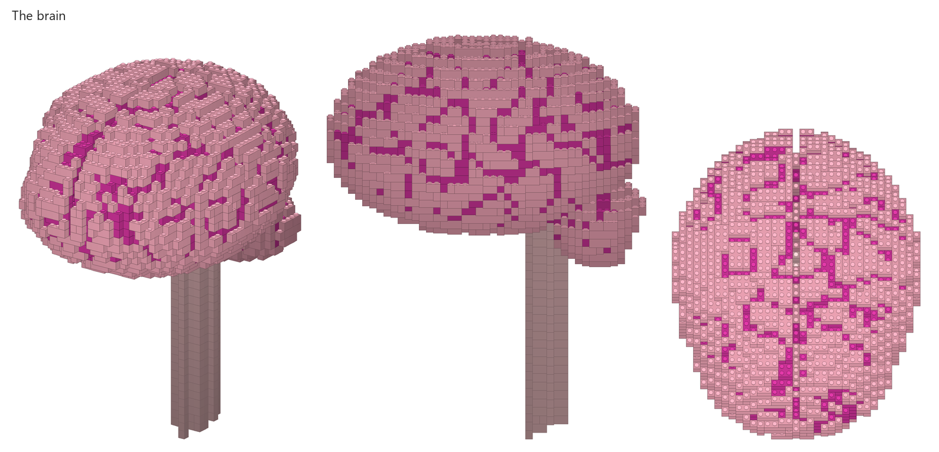 2,287 bricks of brain, with the spinal cord heading off down my neck.
The video’s script is a SELECT
This is the bit I’m pleased about because the whole video, every brick appearing, disappearing and coming back, is a table.
Every brick gets up to three frame numbers: T1 when it first appears, T2 when it’s rewound away, and T3 when it comes back. The renderer shows a brick when:
(frame >= T1 AND frame < T2) OR frame >= T3
The bricks below the half-way point only ever get a T1. The ones between half way and the top get all three. The brain, and the very top of my head, only ever appear once.
The frame numbers are `ROW_NUMBER()` divided by a bricks-per-frame rate. Within each layer the bricks go in order of their angle around the middle (`ATN2`), so every layer sweeps round like the hand of a clock. And the rewind is literally the same query with `DESC` on the end:
/* A. Build the head up to the stop layer */
WITH A AS (SELECT T1, n = ROW_NUMBER() OVER (ORDER BY Y, Angle) - 1
           FROM #T WHERE ModelID = @HeadModelID AND Y <= @Stop)
UPDATE A SET T1 = @f + n / @BuildRate;

/* B. Rewind: the same bricks, backwards, faster */
WITH B AS (SELECT T2, n = ROW_NUMBER() OVER (ORDER BY Y DESC, Angle DESC) - 1
           FROM #T WHERE ModelID = @HeadModelID AND Y > @Back AND Y <= @Stop)
UPDATE B SET T2 = @EndA + n / @RewindRate;
Phase FromFrame ToFrame Layers
A build 1 264 0–53
B rewind 294 337 53–36
C brain 352 542 all
D finish 572 698 36–60Lights, camera, Blender
SQL Server can’t render video. Yet. So Blender reads the script, and every brick and every stud becomes a Geometry Nodes instance: 6,436 bricks and 20,389 studs, as two clouds of points. A handful of nodes check the same `T1`/`T2`/`T3` rule on every frame. Each brick drops into place from 3.5 cm up, and in the rewind they lift back off, like a tape running backwards.
On my RTX 5090 that’s about a second a frame in Cycles. 854 frames, 28.5 seconds of video, about a quarter of an hour.
The failures, as is tradition:
- The first test frames were so overexposed I looked like I’d been carved out of a bar of soap. The fix was to let the camera see a bright white backdrop while the bricks are lit by a much dimmer version of it.
- Rewinding to exactly half way cut off my eyes, and the brain ended up floating above the stump like a pink lollipop on a stick. Half of the *head* (not counting the neck) is eye level, 58% of the way up. With the eyes back, the brain sits in the skull like it should.
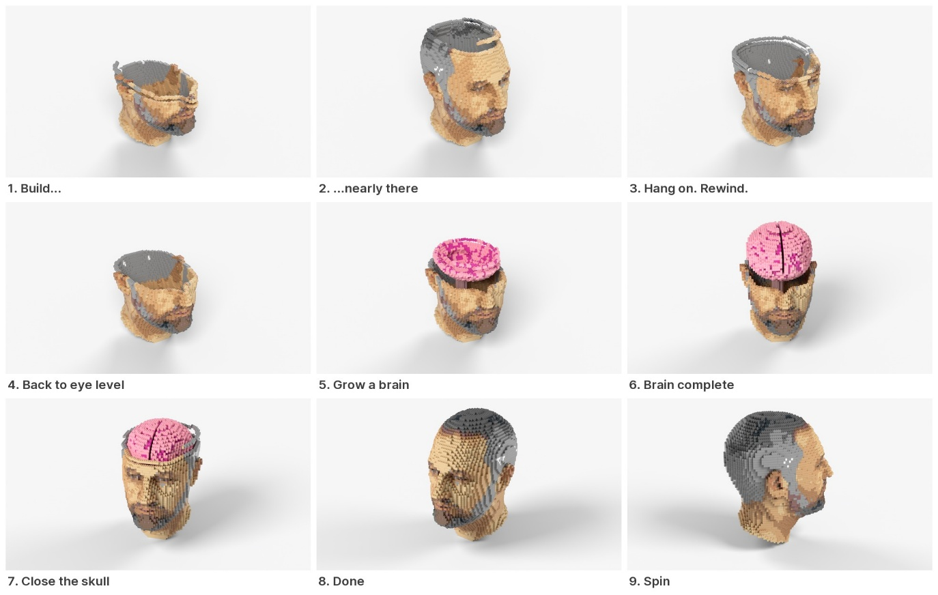 Build. Nearly there. Hang on. Rewind. Grow a brain. Close the skull. Spin.
The whole thing. Every frame of it decided by a SELECT statement.
Last time I promised you a cloning process. Growing my own brain out of a SELECT statement is as close as I’m going to get.
The final numbers
 |                                | Life size | 2× life size |
 | - - - - - - - - - - - - - - - - - - -      | - - - - - - -|
 | 1×1 voxels                     | 8,331     | 66,645       |
 | Hollow shell (2 studs)         | 3,340     | 14,544       |
 | Bricks, uncoloured             | 731       | 2,969        |
 | Bricks, coloured               | 1,061     | 4,149        |
 | Colours                        | 11        | 13           |
 | Building steps (one per layer) | 30        | 61           |
Notice that colour costs bricks. A brick can only be one colour, so every colour boundary chops the big bricks up. Life size went from 731 bricks to 1,061.
The 2× parts list is a fun read: 1,224 1×1 bricks, 1,187 1×2s and 770 2×2s. The biggest colour by a mile is Light Bluish Grey, with 1,057 bricks. Apparently, I am mostly grey. Bit depressing.
Add the brain and it’s 6,436 bricks. A third of them are brain. I’m choosing to be flattered by that.
What’s next
- Fix my chin. Probably by keeping Medium Brown out of the beard, or by switching to dominant colour just for that area.
- Will it fall apart? Every brick needs to connect to the bricks below it through at least one stud. That’s a graph reachability problem, and SQL Server has graph tables and `SHORTEST_PATH`.
- Actually building it. 4,149 small plastic bricks and Brian the sausage dog in the same house. That’s a problem for future me.
And the robot eyes are still in the drawer.
Hope you enjoyed the article, and the failures. I’ll get the code up on GitHub.
Trevor (@sqlartist)